Author: Max Artemenko, POS Systems Expert & Product Architect, Smart Payment Solutions (USA) · 12+ years implementing Shift4 Dine in US restaurants
This article provides general information about POS offline mode technology and does not substitute for consultation with a qualified technology or payment processing specialist regarding your specific business environment.
“In twelve years of POS deployments, the question I hear most often after a bad Friday night isn’t about menu setup or tip screens — it’s ‘why did our system freeze when the internet dropped?’ The answer is almost always the same: the restaurant had a cloud-dependent POS with no real offline architecture. One outage, and the whole floor went manual. That’s the problem this article addresses.” — Max Artemenko, Smart Payment Solutions
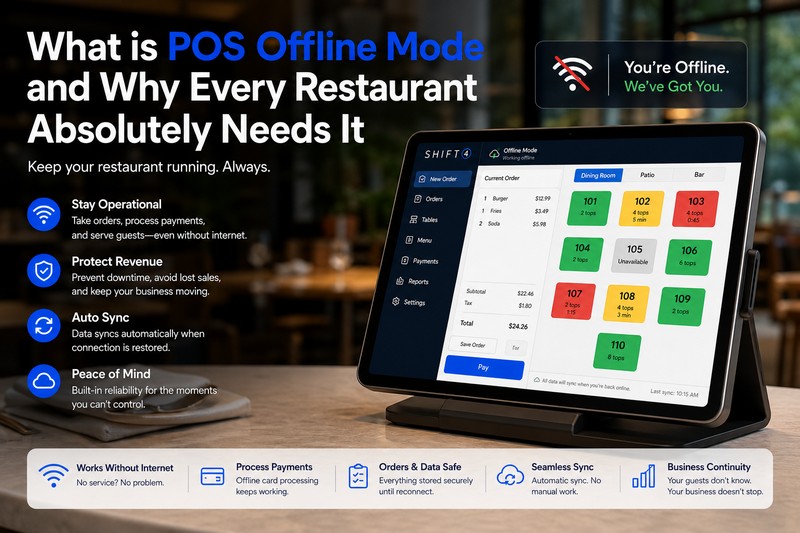
A properly architected POS offline mode keeps your restaurant running — orders routing, cards processing, kitchen firing — without internet. This article covers how it works technically, what risks to manage, how to set up network redundancy, and what to ask vendors before you buy.
The Real Cost of Downtime: Why Every Second Counts in Your Restaurant
Internet outages cost restaurants revenue in real time — and the damage compounds fast. When a POS loses connectivity with no offline capability, every transaction stops. Staff improvise. Lines form. Customers leave.
The average full-service restaurant processes 150–300 covers on a busy Friday. If the POS goes dark for 20 minutes during peak hours, that’s a direct hit to throughput — not a recoverable situation if the system wasn’t built for it. Industry data puts the revenue loss at $300–500 per minute of downtime during peak service — the cascade matters more than most owners realize until it happens.
The problem isn’t just revenue. It’s operational chaos: servers writing orders on paper, managers manually calculating checks, kitchen staff guessing on modifications. Every workaround introduces errors that show up in reconciliation the next morning.
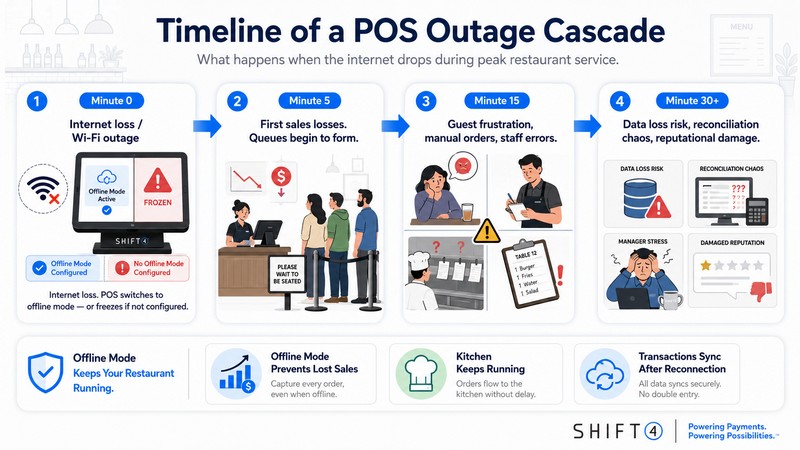
POS Offline Mode: How Your Restaurant POS System Works During an Internet Outage
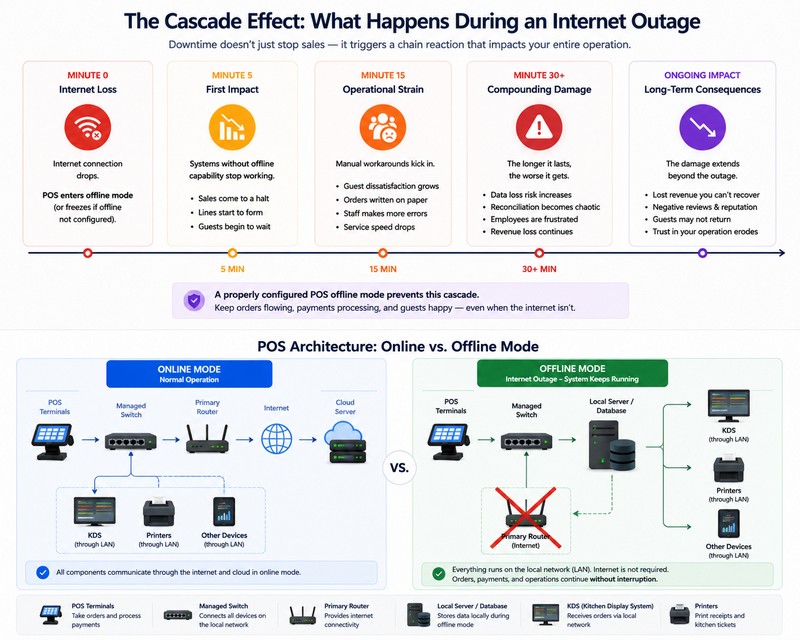
When internet connectivity fails, a properly configured Shift4 Dine switches to offline mode automatically — no manual intervention required. The system keeps running on local infrastructure.
The POS terminal holds a local copy of your entire menu: items, prices, modifiers, combos, tax rules. When the internet drops, the terminal stops talking to the cloud and works entirely off that local database. Orders are entered, routed, and stored locally. Kitchen display systems (KDS) continue receiving tickets through the local area network (LAN) — the same physical network connecting your terminals, KDS units, and printers inside the building. None of that traffic touches the internet.
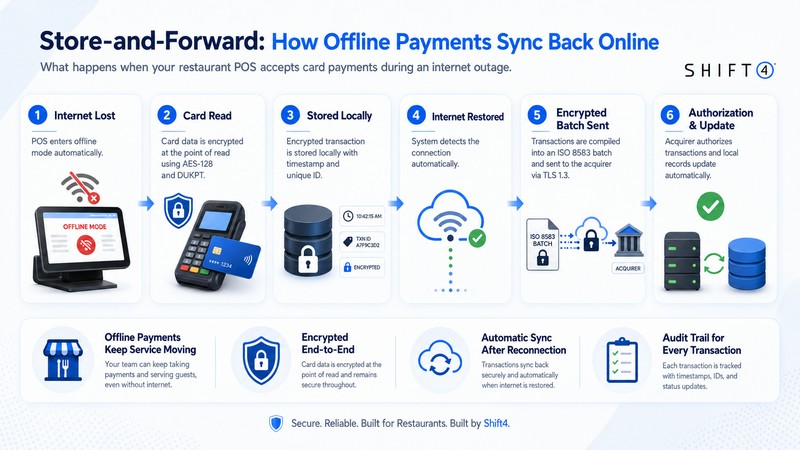
Payment transactions are captured, encrypted, and stored locally with a timestamp and unique reference ID. They sit in the queue until connectivity is restored, then sync automatically.
The key distinction: true offline mode means the system was architected to run locally. It’s not a degraded fallback — it’s a parallel operating mode. Some POS systems advertise “offline capability” but require cloud authentication to log in, or can’t update menus without internet. Those aren’t truly offline-capable — they’re cloud-dependent systems with a short grace period.
Offline Payment Processing: Accepting Credit Card Payments Without Internet
Credit card payments continue in offline mode through store-and-forward technology. The terminal captures card data, encrypts it locally, stores the transaction, and sends it to the processor once connectivity returns.
When a card is swiped or inserted, the terminal reads the track data or EMV chip cryptogram. The transaction — including tokenized PAN, amount, timestamp, terminal ID, and merchant reference — is encrypted using DUKPT-derived AES-128 keys at the point of read. The encrypted record is stored in secure local memory. When internet is restored, the system compiles all stored transactions into an ISO 8583 batch, authenticates via TLS 1.3, and transmits to the acquirer for authorization and settlement.
PCI DSS v4.0 (PCI Security Standards Council, March 2022 — pcisecuritystandards.org) governs how this data must be handled: no full card numbers stored in plain text (Requirement 3.3), end-to-end encryption of stored data, audit logs for every batch transmission (Requirement 10.4), prohibition on offline magstripe-only transactions post-2025 (Requirement 9.5.1) — EMV chip is required — and a limit of 10 fallback transactions per device per session (Requirement 12.3.2).
Receipts printed during offline mode carry a unique reference number linking the customer’s paper receipt to the transaction record in the sync queue — critical for any dispute before the batch clears.
“From my experience deploying SkyTab in full-service restaurants: the most common staff mistake during an outage is assuming card payments ‘didn’t go through’ because there’s no immediate authorization response. The transaction is queued. It will process. The receipt is valid. Training staff on this point before an outage happens — not during one — is what separates a smooth recovery from a billing mess.” — Max Artemenko, Smart Payment Solutions
Managing Risks: Delayed Authorization and Declined Payments
Delayed authorization carries real financial risk. The transaction was accepted offline — but actual authorization happens after sync. By that time, the card may have insufficient funds, expired, or been flagged for fraud.
Per EMVCo specifications (EMV 4.3 Book C-8 Kernel, 2022 — emvco.com), offline EMV transactions carry inherent authorization uncertainty: the issuer’s final decision comes at online authorization, not at the point of swipe. Visa’s Risk Management for EMV Contactless guidelines (2022) and Mastercard’s Contactless Risk Management Guidelines (2023) identify the same risk vectors: balance changes between offline capture and online auth, expired card detection failures, and fraud pattern triggers from unusual transaction clustering.
Duplicate transaction risk is the other major exposure. This is preventable with unique transaction IDs and controlled retry logic (EMVCo EMV 4.3, 2022; PCI DSS v4.0, Req 10.2.1, 2022 — pcisecuritystandards.org).
Practical risk controls:
| Risk | Control Mechanism | Standard Reference |
|---|---|---|
| Insufficient funds at auth | Per-transaction offline limit ($100–$500) | PCI SSC PTS POI Guidelines v4.0, 2023 |
| Expired card | Staff visual check before processing | PCI DSS v4.0, Req 9.5.1, 2022 |
| Fraud flag triggers | Cumulative offline limit per device | EMVCo EMV 4.3, 2022 |
| Duplicate transactions | Unique transaction IDs + dedup algorithms | PCI DSS v4.0, Req 10.2.1, 2022 |
| High-value exposure | Manager approval threshold (e.g., >$300) | Operational best practice |
| Audit gaps | Tamper-proof transaction logs | PCI DSS v4.0, Req 10.2.1, 2022 |
The $100–$500 per-transaction offline limit recommended by PCI SSC (PTS POI Offline Mode Guidelines v4.0, 2023 — pcisecuritystandards.org) is a practical floor. For fine dining where average checks run $150+, that limit needs to be set deliberately — too low and you’re turning away valid transactions; too high and you’re absorbing decline risk.
Potential Risks During Offline Payment Processing — Staff Checklist:
✔ Verify card expiration date before processing
✔ Set per-transaction offline limit ($100–$500 based on your check average)
✔ Require manager approval for transactions above your threshold
✔ Monitor declined transactions immediately after sync completes
✔ Maintain detailed manual logs for dispute resolution
✔ Test offline mode monthly to catch configuration issues before an outage
Batch Sync and Data Reconciliation After Reconnection
When internet is restored, the POS initiates batch synchronization automatically. All accumulated offline transactions transmit to the cloud server in a single encrypted payload, typically completing within 2–5 minutes for most restaurant volumes.
Per NIST SP 800-53 Rev. 5 (2020, updated 2023 — csrc.nist.gov), contingency planning standards require automatic background sync queues to merge data upon reconnection with sync initiation under 1 minute from reconnection detection.
Realistic timing per phase:
| Sync Stage | Timing | Mode |
|---|---|---|
| Network reconnection detected | -90 dBm (~$150–$400) |
- Managed Layer 3 switches with VRRP/HSRP — at least two units (~$200–$800 each)
- UPS for all critical devices — 1000VA+, ≥30 min runtime, auto-bypass (~$100–$250)
- Mesh Wi-Fi for terminal coverage throughout the floor
- Monthly failover test — simulate primary failure, verify “Shift4 Dine includes 24/7 live support — one of the consistent points in client feedback across deployments I’ve managed. One client put it directly: ‘They have 24-hour customer service so you have access to getting any issues resolved at any time of the day, 7 days a week.'” — Max Artemenko, Smart Payment Solutions (see Shift4 Dine reviews on Trustpilot)
Critical evaluation criteria:
| Criterion | What to Verify |
|---|---|
| Offline architecture | Local DB replication — standard, not add-on |
| Failover mechanism | Tested in your environment, not just vendor demo |
| Transaction limits | Configurable per your check average |
| Sync documentation | Clear process with audit trail |
| Support availability | 24/7 for offline-related issues |
| Hardware requirements | Local server needs, switch specs, UPS |
| Scalability | Multi-terminal, multi-location support |
| Pricing transparency | Total cost including hardware and training |
Common Pitfalls: Why Some “Offline Modes” Fail in Real-World Scenarios
Most offline mode failures trace back to four architectural shortcuts.
The sync conflict trap. The system lacks proper deduplication. When connectivity returns, the same transaction processes twice — the customer gets double-charged. Preventable with unique transaction IDs and controlled retry logic (EMVCo EMV 4.3, 2022; PCI DSS v4.0, Req 10.2.1, 2022). If a vendor can’t explain their deduplication mechanism specifically, that’s a red flag.
Hidden cloud dependencies. The vendor claims offline capability, but the system requires internet to authenticate users at login, push menu updates, or validate loyalty lookups. True offline mode means local authentication, local menu data, and local transaction processing — no exceptions.
Unencrypted local storage. During extended outages, transaction data accumulates locally. If that storage isn’t encrypted with AES-256 (NIST SP 800-175B, 2020 — csrc.nist.gov) and access-controlled, it’s a target. PCI DSS v4.0 Requirement 3.3 prohibits storing full card numbers in plain text — but implementation varies by vendor. Confirm encryption standards in writing before deployment.
Poor reconnection handling. Some systems fail to handle the transition back to online mode gracefully — data corruption, missed transactions, or sync loops are documented failure modes. Ask vendors specifically: “What happens if connectivity is lost and restored three times in one hour?”
“In one deployment I managed for a multi-location bar group, the previous POS vendor’s ‘offline mode’ required cloud authentication for every staff login. When the internet dropped, terminals locked out. Staff couldn’t process a single transaction. The fix was migrating to SkyTab with proper local auth — but the lesson cost them a full Saturday night’s revenue first.” — Max Artemenko, Smart Payment Solutions
Immediate Steps: Hardware and Network Troubleshooting During an Outage
Step 1 — Verify offline mode activation (10 seconds)
Check all POS terminals and KDS units for the offline status indicator. A properly configured system transitions within 10–30 seconds of internet loss. If terminals show errors rather than an offline indicator, that’s a configuration issue, not a connectivity issue.
Step 2 — Check primary router status (30 seconds)
Verify the primary router is powered and showing active status lights. Power cycle if needed: 30 seconds off, then on. Most router-related outages resolve here.
Step 3 — Verify local network connectivity (1 minute)
Confirm all POS terminals and KDS units are connected to the local network. If a device has dropped off the LAN, reconnect it manually. The LAN is what keeps kitchen tickets routing.
Step 4 — Activate secondary 4G/5G router (1–2 minutes)
If configured for automatic failover (per NIST SP 800-53 SC-7, 2020 — csrc.nist.gov), verify it has activated. Signal strength should be above -90 dBm for reliable operation.
Step 5 — Test local order flow (2 minutes)
Process a test transaction on a POS terminal and verify it routes to the KDS through the local network.
Step 6 — Contact your ISP (ongoing)
If primary internet remains down after 5 minutes, call your ISP to report the outage and get an estimated restoration time. Log the call time and reference number.
Step 7 — Monitor sync upon reconnection (5–10 minutes)
Once internet is restored, watch the automatic sync process through completion. Check for declined transactions immediately.
Staff Protocol: How to Handle Offline Transactions Safely
Operational integrity during an outage depends on staff training happening before the outage, not during it.
Before the outage: Conduct monthly offline mode drills. Every staff member should identify the offline indicator, explain store-and-forward to a guest, and know the escalation path: server → manager for any transaction above the offline limit threshold.
During the outage:
- Inform guests calmly: “Our system is temporarily offline, but we can still process your payment — your card will be charged normally.”
- For card payments: swipe or insert card, enter amount, obtain the offline receipt with reference number, provide it to the guest.
- For transactions above the configured threshold (e.g., >$300): require manager approval.
- Maintain a manual transaction log — timestamp, amount, payment method, last four digits of card, table number.
- Do not process refunds without manager authorization.
After reconnection:
- Monitor sync to completion (2–5 minutes).
- Review sync report: confirm all offline transactions processed, check for declined items.
- Contact affected customers for declined transactions before end of business day.
- Reconcile manual transaction log against the sync report.
- Document the outage: start time, end time, transaction count, any issues.
| Phase | Role | Key Actions |
|---|---|---|
| Before Outage | Manager | Monthly offline drills, configure transaction limits, document network topology |
| Before Outage | All Staff | Know offline indicator, understand store-and-forward, know escalation path |
| During Outage | Cashier/Server | Process cards via store-and-forward, maintain manual log, communicate with guests |
| During Outage | Manager | Approve high-value transactions, monitor floor, contact ISP if needed |
| During Outage | Kitchen | Continue normal operations — KDS receiving tickets via LAN |
| After Reconnection | Manager | Review sync report, contact declined-card customers, reconcile logs |
| After Reconnection | Cashier/Server | Verify receipts match sync records, flag discrepancies |
Managing Online Ordering and Third-Party Integrations During Downtime
Third-party delivery platforms — DoorDash, Uber Eats, Grubhub — require internet connectivity. When the network goes down, those integrations pause. New orders stop coming in through platform APIs. This is a structural limitation of any API-dependent integration, not a POS configuration issue.
Before an outage: Configure your online ordering system to display “temporarily unavailable” automatically when the integration loses connectivity. Train staff on manual phone order intake.
During an outage: Phone orders only. Enter them into the POS as standard orders — they route to the KDS normally through LAN. Do not attempt to process orders through delivery platform tablets; they will fail and may create duplicate order confusion on reconnection.
After reconnection: The POS syncs with delivery platforms automatically. Verify with each platform what their behavior is during restaurant-side outages — some queue orders and deliver on reconnection; others drop them.
Step-by-Step: How to Reconnect and Upload Pending Transactions
Step 1 — System detects reconnection *(automatic, “If you’re evaluating Shift4 Dine or want a network assessment for your current setup, the team at Smart Payment Solutions has done this across dozens of US restaurant deployments. The conversion process is straightforward — one client described it: ‘Max and his team made the conversion so seamless.’ That’s the standard we work to.” — *Max Artemenko, Smart Payment Solutions*
Schedule a Demo — get a network assessment and see SkyTab offline mode in your actual environment before you commit.