Restaurant Reporting

Reporting & Analytics for Better Operational Decisions

Explore sales, labor, order channels, inventory information where supported, multi-location performance, and operational trends through connected Shift4 Dine reporting.
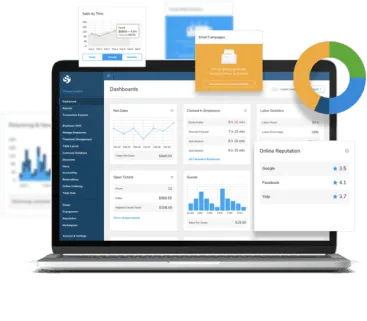
Restaurant reporting dashboard with sales, labor, channel, and location views
Deeper Restaurant Analysis

Move From Daily Activity to Useful Trends

Reporting & Analytics helps owners and managers review detailed restaurant performance beyond a quick current-shift check.

  • Sales and transaction reports
  • Labor and employee reporting
  • Order and channel breakdowns
  • Supported location and inventory views

See the Reporting Views That Fit Your Operation

Tell us which sales, labor, channel, inventory, or location questions matter to your team.

A Shift4 Dine Partners specialist will follow up about your reporting needs.

Understand What Is Happening Across the Restaurant

Connected reports bring sales, labor, order mix, channels, and other operational information into views designed for review and analysis. Teams can use that context to identify patterns and investigate changes over time.

Turn Restaurant Data Into Operational Context

A single metric rarely explains restaurant performance. Reporting helps teams compare periods, channels, employees, menu activity, and locations so decisions can be based on a broader view.

What Connected Reporting Helps You Do

See the Full Picture

Review related sales, labor, order, and location information instead of isolated totals.

Identify Trends

Compare reporting periods and operational patterns over time.

Compare Channels

Understand how dine-in, takeout, delivery, and online channels contribute where tracked.

Review Locations

Compare supported locations with consistent reporting views for multi-unit operations.

Core Reporting & Analytics Areas

Sales Reporting

Review sales activity by relevant periods, categories, employees, channels, and locations.

Labor Reporting

Review supported hours, employee performance, labor indicators, and comparisons with sales.

Order & Channel Mix

Break down dine-in, takeout, delivery, online, and other tracked order activity.

Operational Trends

Compare periods and identify patterns that deserve a closer operational review.

Reporting Views for Restaurant Operations

A closer look at the tools your team will use every day.

Sales Reports

Review sales by time period and available operational dimensions.

Labor Reports

Analyze supported employee hours, sales activity, and labor indicators.

Order Breakdown

Understand item, category, service type, and order-channel activity where tracked.

Multi-Location Comparison

Compare supported restaurant locations through consistent reporting views.

Inventory Reporting

Review available stock, usage, and inventory information where inventory tools are configured.

Trend Analysis

Compare periods and look for operational patterns across restaurant activity.

Back Office Context

Use Reporting Inside a Broader Management Workflow

Customer Hub supports broader back-office work around reporting, menus, inventory, POS settings, customer information, and administration.

Explore Customer Hub Back Office →
Reporting Scope

Go Deeper Than a Current-Shift Snapshot

Use Reporting & Analytics when the question requires period comparisons, channel breakdowns, employee or menu detail, and broader trend review.

Three Connected Ways to Work With Restaurant Data

Reporting & Analytics, the Mobile App, and Customer Hub support different levels of operational work within Shift4 Dine.

WorkflowToolPrimary Role
Reporting & AnalyticsDetailed reporting workspaceDeeper reports, period comparisons, trends, and analysis
Shift4 Dine Mobile AppMobile monitoring viewQuick live KPIs and current operational monitoring on the go
Customer Hub Back OfficeManagement workspaceBroader configuration, administration, menus, inventory, and customer tools

Reporting Setup & Support

Shift4 Dine Partners can help review reporting access, relevant views, location permissions, and how different management roles use Reporting, the Mobile App, and Customer Hub.

  • Report Orientation
  • User Access
  • Location Permissions
  • Workflow Guidance
  • Ongoing Questions

Trusted by 153,000+ Businesses Nationwide

Coral HospitalityLive!Shoney'sTaffer's Tavern7PIENot Your Average Joe

What Our Clients Say

Powered by Google Reviews

Posted on Google Google
Olivia Ramos profile picture
Olivia Ramos
Google star 1Google star 2Google star 3Google star 4Google star 5Trustindex verifies that the original source of the review is Google.
Very well trained professional work done right! Best POS by far! Definitely will be recommending to all my business friends! The customer service has gotten better and I love the fact that they have real technicians that can come by to fix issues next day!
Posted on Google Google
Little Pecan Bistro profile picture
Little Pecan Bistro
Google star 1Google star 2Google star 3Google star 4Google star 5Trustindex verifies that the original source of the review is Google.
Costs of using this POS is much cheaper than some companies in the market. Customer service in general is very caring and professional. The system is easy to operate with. The online gift cards purchase isn’t user friendly, called service team several times, not so much improvement has been made. Hopefully in the future they may solve the problem.
Posted on Google Google
Ray Murray profile picture
Ray Murray
Google star 1Google star 2Google star 3Google star 4Google star 5Trustindex verifies that the original source of the review is Google.
Did a lot of research on different POS before deciding on this one for 3 restaurants. Very happy with our decision. It has all of the modern equipment and convenience features we wanted at a better price point than most others out there. The 3 restaurants are all different so it’s nice to be able customize the set up to fit each one’s unique needs. Very user friendly interface on POS, handhelds, and back office log in. All in all a really great value!
Posted on Google Google
BROOKLINE FAMILY Restaurant profile picture
BROOKLINE FAMILY Restaurant
Google star 1Google star 2Google star 3Google star 4Google star 5Trustindex verifies that the original source of the review is Google.
I’m very fond of this and will continue to do business with them, very helpful always and good care whenever needed.
Posted on Google Google
DONGWOO PARK profile picture
DONGWOO PARK
Google star 1Google star 2Google star 3Google star 4Google star 5Trustindex verifies that the original source of the review is Google.
best pos system! especially Max the sales rep helped us a lot with setting up the account!
Posted on Google Google
Carmelo Graceffa profile picture
Carmelo Graceffa
Google star 1Google star 2Google star 3Google star 4Google star 5Trustindex verifies that the original source of the review is Google.
Sales rep Max worked with us on selling and installing a brand new Harbortouch POS. He was helpful every step of the way. He knows the product and he adjusted the software to work for our restaurant. The system is pretty easy to use. Remote tech support is available to troubleshoot when we need them. We're pretty satisfied. This was our very first POS. Our operations streamlined significantly.
Posted on Google Google
Jim Tziavas profile picture
Jim Tziavas
Google star 1Google star 2Google star 3Google star 4Google star 5Trustindex verifies that the original source of the review is Google.
We just got our pos system in our restaurant. Everything works good so far. We like accepting Apple Pay and Online Orders directly through the system. The POS itself is very easy to use. The guys at Harbortouch POS of Boston showed us great support since the installation. They have been in our restaurant for the whole week until our staff got used to everything. 5 stars deserved!

Frequently Asked Questions

What can restaurant reporting show?

Available reports can cover sales, transactions, labor, employees, items, categories, order channels, locations, and other operational information.

Does Shift4 Dine provide real-time reporting?

Current operational information can be available in connected reporting views. Data availability and refresh behavior depend on connectivity and configuration.

Can I compare restaurant locations?

Supported multi-location configurations can provide consistent views for comparing permitted restaurant locations.

Is inventory reporting available?

Inventory information and reports can be available where Shift4 Dine inventory tools are configured for the restaurant.

How is Reporting & Analytics different from the Mobile App?

Reporting & Analytics is for deeper reports, comparisons, and trends. The Mobile App is designed for quick current KPIs and operational monitoring on the go.

How is Reporting & Analytics different from Customer Hub?

Reporting focuses on analysis. Customer Hub is the broader back-office workspace for reporting plus configuration, menus, inventory, customer tools, and administration.

See the Reporting Views That Fit Your Operation

Tell us which sales, labor, channel, inventory, or location questions matter to your team.

A Shift4 Dine Partners specialist will follow up about your reporting needs.

Ready for a Clearer View of Restaurant Performance?

Use connected reporting to explore operational detail, comparisons, and trends.

Brand update

Shift4 Dine, formerly SkyTab POS

Shift4 Dine is the updated restaurant POS solution previously known as SkyTab POS. If you are searching for any of the products below, they are now part of the updated Shift4 Dine product family: