
Managing Multiple Tables
Help servers keep track of active checks, guest requests, and order updates across a busy dining room.
Shift4 Dine helps servers manage tables, take orders, send details to the kitchen, and close checks with fewer extra steps during busy dining room service.
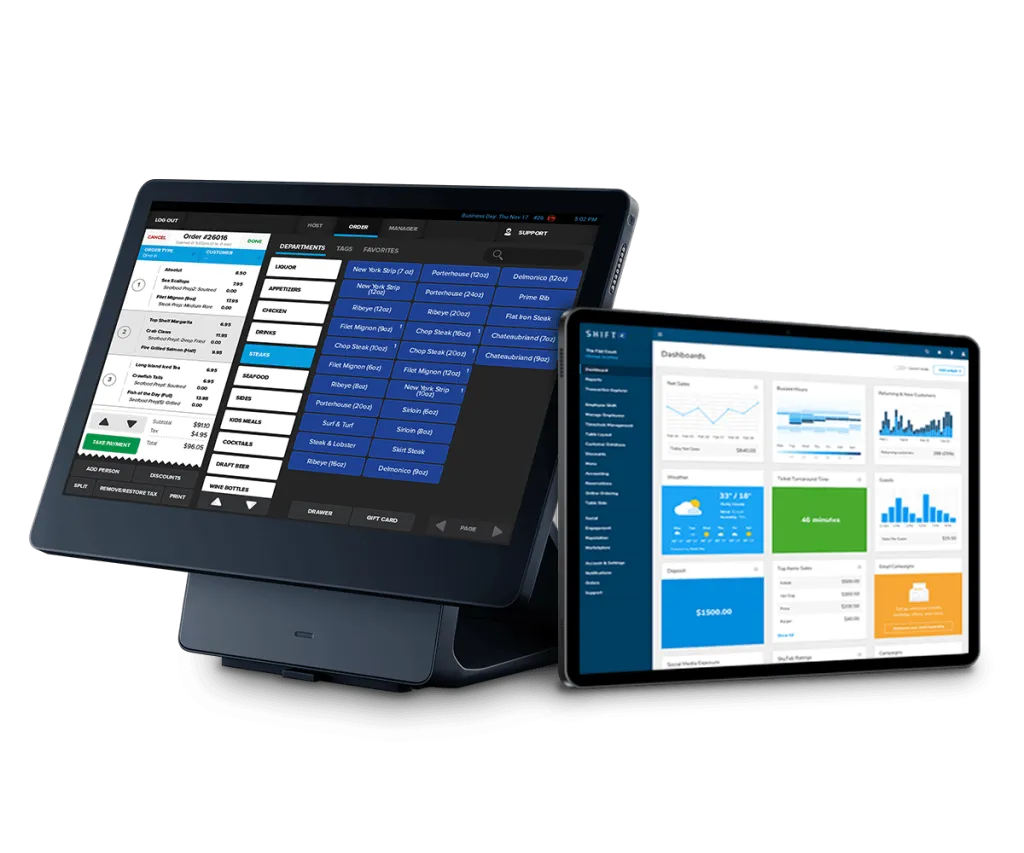
A table service POS system should help staff manage orders efficiently, reduce mistakes, keep service moving, and make the dining experience easier for guests.
Fill out the form and a specialist will contact you within 24 hours.
Table service depends on timing, accuracy, and clear communication between servers, guests, and the kitchen. Shift4 Dine, formerly SkyTab POS, connects order entry, payments, hardware, and reporting so dining room teams can keep checks moving from first order to final payment.
From taking orders at the table to adding modifiers, sending items to prep areas, splitting checks, and reviewing performance, Shift4 Dine supports the daily order processing and guest experience needs of table service restaurants.
Table service teams balance guest attention, order accuracy, kitchen timing, and payment flow throughout the meal.
Help servers keep track of active checks, guest requests, and order updates across a busy dining room.
Use structured menus, modifiers, and notes to capture order details more consistently before they reach the kitchen.
Route order details from the dining room to prep areas so servers and kitchen teams stay aligned.
Reduce unnecessary steps around ordering and payment so service can move smoothly at the guest’s pace.
Follow the check from the first table interaction through ordering, kitchen routing, changes, split checks, and payment.
Open the guest check and keep the service flow connected from the start of the visit.
Use handheld or station-based order entry to capture items, notes, and modifiers closer to the guest.
Route order details to prep areas so kitchen teams see what needs to be made next.
Add courses, adjust modifiers, and update checks as guests order throughout the meal.
Support flexible checkout workflows for shared tables, separate guests, and tableside payments.
Practical POS tools for order entry, modifiers, kitchen routing, check management, mobile service, and restaurant operations visibility.
Help servers enter items, notes, and guest requests quickly during busy dining room service.
Set up menu options, modifiers, prep notes, and item details around how your kitchen prepares orders.
Send order information to the right prep areas to reduce missed details between the floor and kitchen.
Give staff flexible payment workflows for shared meals, individual checks, and guest payment preferences.
Use handheld devices to take orders and accept payments closer to the guest when the workflow calls for it.
Review sales, item activity, staff performance signals, and restaurant operations data from one platform.
Help servers take and process orders faster with fewer repeated steps during table service.
Reduce order errors by capturing modifiers, notes, and routing details more consistently.
Make service feel smoother by keeping ordering, updates, and payment workflows connected.
Support different table-service formats, from casual dining to more structured full-service workflows.
Use one table service POS foundation across different dining concepts and service styles.
Support seated dining workflows with connected order entry, payments, routing, and reporting.
Help staff manage detailed orders, guest requests, and check flow with a configurable POS setup.
Keep busy dining room teams moving with practical tools for orders, checks, payments, and service visibility.
Adapt table-service workflows for smaller dining rooms, patio service, and mixed counter-and-table concepts.
Shift4 Dine connects dining room workflows, kitchen communication, payments, hardware, and reporting without adding unnecessary complexity.
Run workstations, handhelds, kitchen displays, payments, and POS workflows as one connected restaurant system.
Configure menus, modifiers, service areas, roles, and devices around the way your dining room operates.
Give servers handheld options for ordering and payment when tableside service fits your workflow.
Work with a team that can help with configuration, menu setup, installation coordination, training, and ongoing POS needs.
Map the POS setup around service areas, staff roles, devices, order types, and checkout workflows.
Set up menu items, modifiers, prep notes, and routing details for consistent order entry.
Coordinate hardware setup for handhelds, workstations, kitchen displays, payment devices, and accessories.
Help servers, managers, and support staff understand order flow, check management, payments, and reporting.
Provide continued assistance as your team uses, adjusts, and expands the Shift4 Dine system.

Kiosk (SkyTab) is a self-service restaurant ordering system that lets guests browse the menu, customize items, place orders, and complete supported payments…

(SkyTab) Workstation is a fixed restaurant POS terminal for order taking, check management, payments, and day-to-day front-of-house operations. It serves as the…

Customer-facing Display (SkyTab) is an interactive guest-facing POS screen that shows order details and supports checkout directly at the counter. Guests can…

Tablet (SkyTab Glass) is an 8-inch mobile restaurant POS tablet designed for tableside ordering, check management, and supported payments throughout the restaurant.…
Trusted by restaurant service teams
Powered by Google Reviews
A table service POS system helps restaurants manage seated dining workflows, including order entry, kitchen routing, check updates, payments, and reporting.
Shift4 Dine connects order entry, payments, hardware, kitchen routing, and reporting so servers and managers can keep service moving from one platform.
Yes. With compatible handheld hardware, servers can take orders and accept payments closer to the guest as part of the table-service workflow.
Yes. Shift4 Dine can support flexible check handling, item updates, modifiers, and order notes for common table-service needs.
Yes. Menus, modifiers, service areas, devices, roles, and workflows can be configured for full-service, fine dining, casual dining, cafés, and bistro-style concepts.
Shift4 Dine is designed for everyday restaurant workflows, and Shift4 Dine Partners can help with setup, menu programming, training, and ongoing support.
Share a few details and a Shift4 Dine specialist will help recommend a practical setup for your table-service workflow.
Build a connected table service POS setup for orders, payments, kitchen routing, reporting, and smoother guest experiences.
Shift4 Dine is the updated restaurant POS solution previously known as SkyTab POS. If you are searching for any of the products below, they are now part of the updated Shift4 Dine product family:


