Self-service orders
Let guests place an order at their own pace.
Free hardware included with subscription
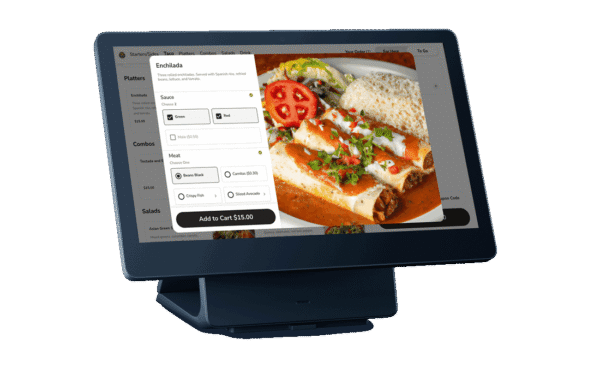
Kiosk (SkyTab) is a self-service restaurant ordering system that lets guests browse the menu, customize items, place orders, and complete supported payments directly from the touchscreen. Orders flow into the Shift4 Dine POS and kitchen workflow without requiring staff to re-enter them.
Kiosk (SkyTab) is a self-service restaurant ordering kiosk that lets guests browse the menu, customize items, place an order, and complete payment directly from a touchscreen. Instead of requiring every order to begin with a cashier, the kiosk gives customers another way to move through the ordering process at their own pace while keeping the transaction connected to the restaurant’s Shift4 Dine POS environment.
The self-ordering kiosk uses the restaurant’s configured menu and can support different order flows based on how the location operates. Restaurants can create options such as dine-in, pickup, or other supported order types and map those selections to the corresponding workflow in Shift4 Dine. Menu items, modifiers, guest questions, informational messages, tipping options, and order restrictions can also be configured through the Kiosk settings, allowing the ordering experience to reflect the restaurant’s actual menu and service model.
Payment is built into the Kiosk hardware rather than requiring a separate checkout station. The current Shift4 Dine Kiosk is an Android device with a 14-inch HD touchscreen and integrated support for chip, magnetic-stripe, and NFC payments. Once an order is submitted, it connects with the Shift4 Dine Workstation workflow so restaurant staff can continue handling the ticket through the same POS environment used for other orders.
Kiosk (SkyTab) is particularly relevant for quick-service restaurants, counter-service concepts, food halls, cafés, and other operations where guests may prefer to place their own orders. Restaurants can also customize elements of the kiosk experience, including branding, language options, screensavers, order flows, and tip settings. Rather than functioning as an isolated ordering terminal, the restaurant kiosk becomes another ordering channel within Shift4 Dine, connecting guest self-service with the menu, payment process, Workstation, and broader restaurant order workflow.
Let guests place an order at their own pace.
Guide guests from menu selection to order submission.
Support choices and modifiers during the kiosk order flow.
Send completed orders into the restaurant POS and kitchen flow.
Support electronic receipt workflow after an order is completed.

(SkyTab) Workstation is a fixed restaurant POS terminal for order taking, check management, payments, and day-to-day front-of-house operations. It serves as the…

Customer-facing Display (SkyTab) is an interactive guest-facing POS screen that shows order details and supports checkout directly at the counter. Guests can…
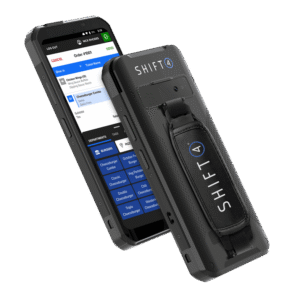
A handheld restaurant POS for taking orders, managing checks, and accepting payments away from the main workstation.
Shift4 Dine, formerly SkyTab POS Shift4 Dine is the updated restaurant POS solution previously known as SkyTab POS. If you are searching for SkyTab POS, SkyTab Solo, SkyTab Mobile, SkyTab Air, SkyTab Kiosk, or SkyTab Kitchen Display System, these products are now part of the updated Shift4 Dine product family.
Learn More →Shift4 Dine, formerly SkyTab POS Shift4 Dine is the updated restaurant POS solution previously known as SkyTab POS. If you are searching for SkyTab POS, SkyTab Solo, SkyTab Mobile, SkyTab Air, SkyTab Kiosk, or SkyTab Kitchen Display System, these products are now part of the updated Shift4 Dine product family.
Learn More →Powered by Google Reviews
It is a self-service ordering device for restaurant guests.
Shift4 Dine describes a step-by-step kiosk flow where guests browse and customize orders.
Completed kiosk orders can enter the POS and kitchen workflow.
It is especially useful for quick-service, coffee-shop, and counter-service workflows.
It adds a self-service ordering point while remaining part of the connected restaurant operation.
Have questions about this product? A Shift4 Dine specialist will contact you.
Talk with a Shift4 Dine specialist about this product.
Shift4 Dine is the updated restaurant POS solution previously known as SkyTab POS. If you are searching for any of the products below, they are now part of the updated Shift4 Dine product family:


