Free Hardware

Barcode Scanner

4.4/5 - (26 votes)
$9.99

Free hardware included with subscription

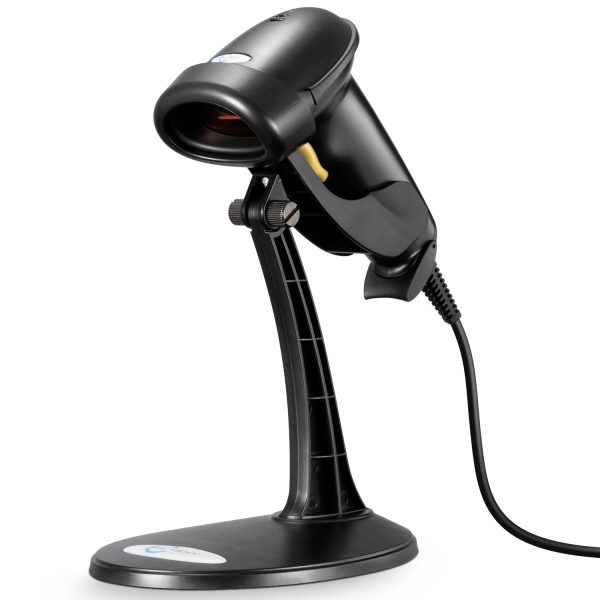
(SkyTab) Barcode Scanner connects with the Shift4 Dine Workstation to simplify barcode-based tasks at the POS. Staff can scan configured UPC items, reopen supported guest checks from printed barcodes, and work with Shift4 gift card QR codes without manually entering the information.

Request Pricing
  • Restaurant POS accessory
  • Restaurant POS hardware
  • Connected restaurant workflow
Product Overview

About the Barcode Scanner

(SkyTab) Barcode Scanner is a 2D restaurant POS barcode scanner that connects with the Shift4 Dine Workstation to make barcode-based tasks faster at the point of sale. Instead of manually searching for an item or entering a code, staff can scan a configured barcode and let the POS identify the corresponding information. This makes the scanner particularly useful for restaurants, cafés, markets, grab-and-go concepts, and other businesses that sell packaged products alongside regular menu items.

For product entry, Shift4 Dine allows a UPC to be assigned to a menu item. Once configured, staff can scan that item during order entry and add it directly to the active ticket. This is useful for bottled drinks, packaged foods, retail merchandise, and other products that already use barcodes. The scanner works as an accessory to the Workstation, keeping barcode scanning inside the same restaurant POS workflow used for orders, checks, and payments rather than requiring a separate system.

The Shift4 Dine barcode scanner can also be used with barcodes printed on guest checks. Restaurants can configure receipt printers to place a barcode on an open guest check, allowing staff to scan the printed receipt and quickly reopen the corresponding ticket. This workflow applies to open tickets and gives employees another way to locate an active check without searching through the POS manually. Kitchen slips can also be configured to print barcodes where that workflow is useful.

(SkyTab) Barcode Scanner also supports scanning QR codes associated with Shift4 gift cards. Staff can use the scanner when checking a gift card balance, loading a card, or accepting a gift card payment instead of manually entering the card number. Current Shift4 Dine hardware documentation identifies the CipherLab 1504p 2D scanner as part of the supported accessory lineup. For restaurants that regularly work with coded products, printed checks, or gift cards, the barcode scanner provides a practical way to reduce repetitive manual entry and keep those actions connected to the main POS.

Compatibility

Works Seamlessly With

✓Shift4 Dine POS workflow
✓Workstation

Why Choose Barcode Scanner?

Barcode scanning

Use barcode scanning as part of a restaurant POS workflow.
Focused POS accessory

Adds a specific operational capability to a connected restaurant POS setup.

Workflow support

Keeps the relevant task available where restaurant staff need it.

Similar Products

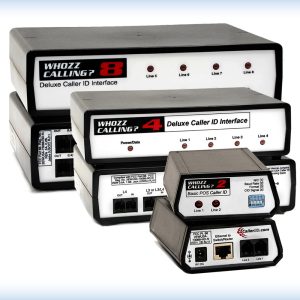
SkyTab Caller ID POS modules – multiple device view

Caller ID

(SkyTab) Caller ID connects incoming restaurant calls with the Shift4 Dine POS workflow. Staff can view caller information on the Workstation, match…

$9.99

What Our Clients Say About Us

Powered by Google Reviews

Posted on Google Google
Olivia Ramos profile picture
Olivia Ramos
Google star 1Google star 2Google star 3Google star 4Google star 5Trustindex verifies that the original source of the review is Google.
Very well trained professional work done right! Best POS by far! Definitely will be recommending to all my business friends! The customer service has gotten better and I love the fact that they have real technicians that can come by to fix issues next day!
Posted on Google Google
Little Pecan Bistro profile picture
Little Pecan Bistro
Google star 1Google star 2Google star 3Google star 4Google star 5Trustindex verifies that the original source of the review is Google.
Costs of using this POS is much cheaper than some companies in the market. Customer service in general is very caring and professional. The system is easy to operate with. The online gift cards purchase isn’t user friendly, called service team several times, not so much improvement has been made. Hopefully in the future they may solve the problem.
Posted on Google Google
Ray Murray profile picture
Ray Murray
Google star 1Google star 2Google star 3Google star 4Google star 5Trustindex verifies that the original source of the review is Google.
Did a lot of research on different POS before deciding on this one for 3 restaurants. Very happy with our decision. It has all of the modern equipment and convenience features we wanted at a better price point than most others out there. The 3 restaurants are all different so it’s nice to be able customize the set up to fit each one’s unique needs. Very user friendly interface on POS, handhelds, and back office log in. All in all a really great value!
Posted on Google Google
BROOKLINE FAMILY Restaurant profile picture
BROOKLINE FAMILY Restaurant
Google star 1Google star 2Google star 3Google star 4Google star 5Trustindex verifies that the original source of the review is Google.
I’m very fond of this and will continue to do business with them, very helpful always and good care whenever needed.
Posted on Google Google
DONGWOO PARK profile picture
DONGWOO PARK
Google star 1Google star 2Google star 3Google star 4Google star 5Trustindex verifies that the original source of the review is Google.
best pos system! especially Max the sales rep helped us a lot with setting up the account!
Posted on Google Google
Carmelo Graceffa profile picture
Carmelo Graceffa
Google star 1Google star 2Google star 3Google star 4Google star 5Trustindex verifies that the original source of the review is Google.
Sales rep Max worked with us on selling and installing a brand new Harbortouch POS. He was helpful every step of the way. He knows the product and he adjusted the software to work for our restaurant. The system is pretty easy to use. Remote tech support is available to troubleshoot when we need them. We're pretty satisfied. This was our very first POS. Our operations streamlined significantly.
Posted on Google Google
Jim Tziavas profile picture
Jim Tziavas
Google star 1Google star 2Google star 3Google star 4Google star 5Trustindex verifies that the original source of the review is Google.
We just got our pos system in our restaurant. Everything works good so far. We like accepting Apple Pay and Online Orders directly through the system. The POS itself is very easy to use. The guys at Harbortouch POS of Boston showed us great support since the installation. They have been in our restaurant for the whole week until our staff got used to everything. 5 stars deserved!

Frequently Asked Questions

What is the Barcode Scanner used for?

It is an accessory for scanning barcodes within a restaurant POS workflow.

Does this work within a Shift4 Dine setup?

This product is intended for use within the Shift4 Dine restaurant POS workflow.

What should restaurants consider when choosing this product?

Consider the service workflow, the staff role using the device, and the connected POS components already in use.

How does this accessory fit into a restaurant setup?

It supports a focused task within the connected Shift4 Dine POS workflow.

Does it replace the POS workstation?

No. It is an accessory that supports a specific restaurant operation role.

Request a POS Consultant to Call You Back

Have questions about this product? A Shift4 Dine specialist will contact you.

Free consultation · No obligations · Response within 24 hours

Ready to Learn More?

Talk with a Shift4 Dine specialist about this product.

Brand update

Shift4 Dine, formerly SkyTab POS

Shift4 Dine is the updated restaurant POS solution previously known as SkyTab POS. If you are searching for any of the products below, they are now part of the updated Shift4 Dine product family: