
“Most POS training fails before it starts — not because the system is complicated, but because no one defined what ‘trained’ actually means. In every SkyTab rollout I’ve run, the restaurants that got staff up to speed fastest had one thing in common: a structured 60-minute floor session, role-specific focus, and a manager checklist for the first live shift.”
— Max Artemenko, skytabpartners.us
Training your restaurant staff on a new point of sale system doesn’t require a full week of classroom sessions. This guide breaks down a practical 60-minute training framework by role — servers, bartenders, cashiers, and managers — covering order entry, payments, split checks, voids, refunds, and first-shift readiness. Every section is built around what actually happens on the floor. Whether you’re running a single location or managing a multi-unit group, the right system training approach cuts adaptation time and keeps your team from learning on live guests.
Why Effective POS Training Is Critical for Restaurant Success
Poor POS training creates three operational failures: order errors that slow the kitchen, cash discrepancies that break reconciliation, and staff frustration that accelerates turnover. All three are preventable with a structured onboarding process.
When servers don’t know how to apply modifiers correctly, wrong items reach the table. When cashiers can’t process a split check under pressure, guests wait. When managers can’t process a void without calling someone, the whole floor stalls.
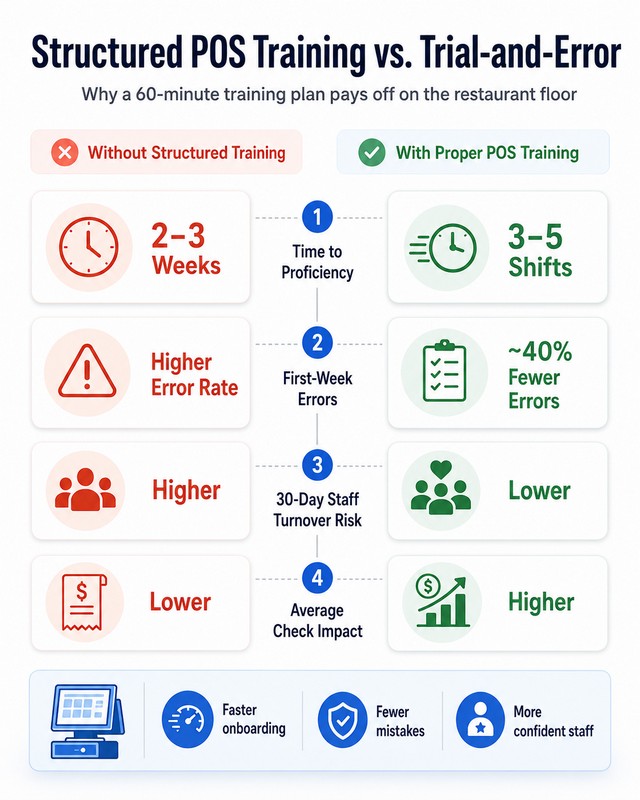
The cost compounds fast. A single incorrect order means lost food cost, wasted kitchen time, and a guest who may not return. Repeated cash drawer variances — even $2–$5 per shift — add up to hundreds of dollars monthly in unresolved discrepancies. Staff who feel undertrained during their first week are significantly more likely to quit within 30 days.
From my experience running SkyTab rollouts across single locations and multi-unit groups in the US, the gap between a smooth launch and a chaotic first week almost always comes down to one thing: whether training was structured or improvised.
Reducing Training Time Without Cutting Corners
Structured training cuts time-to-proficiency significantly. Staff who go through a role-specific session with hands-on practice in training mode reach operational independence in 3–5 shifts — compared to 2–3 weeks of trial-and-error with no structure.
“Trainees who process 50+ transactions on demo terminals in structured sessions reduce first-week errors by approximately 40% compared to unstructured onboarding.” — Association for Talent Development, Retail Training Best Practices (2023)
The mechanism is simple: focused repetition in a safe environment builds muscle memory faster than learning on live transactions under pressure.
“Tech onboarding programs using visual and hands-on methods improve first-login success rates to 85% among new staff groups.” — Society for Human Resource Management, Tech Onboarding (2024)
A server who has processed 30 test orders before their first real shift makes fewer mistakes than one who learned by watching a 20-minute overview video.
Pre-Training Phase: Preparing SkyTab and Your Materials
Good training starts two hours before the session. Three things need to be ready: training mode activated, a one-page cheat sheet printed, and role assignments confirmed.
Setting Up Training Mode in Shift4 Dine
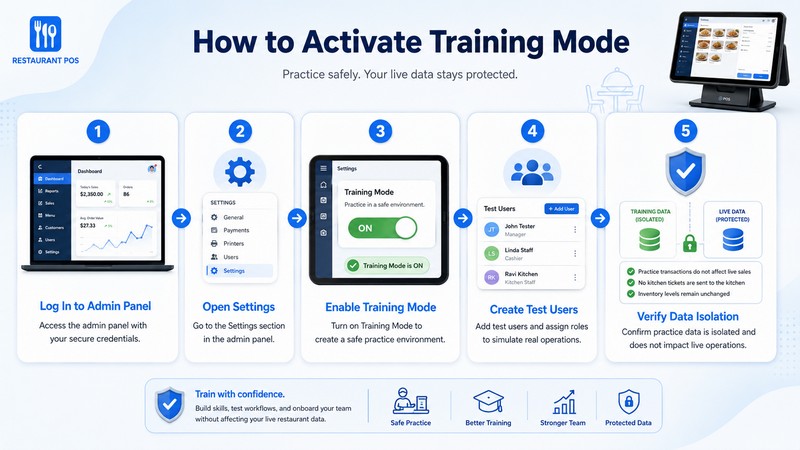
Shift4 Dine includes a training mode that isolates practice transactions from live data. No real charges are processed, no kitchen tickets fire, no inventory is affected.
To activate it: go to the Admin Panel → Settings → Training Mode → Enable. Create test user accounts for each role. Verify that training mode is clearly labeled on the terminal so no one accidentally processes a real transaction during the session.
One thing I flag in every SkyTab implementation: confirm training mode is fully disabled before the first live shift. It sounds obvious, but it’s caused real confusion in restaurants that ran training and go-live on the same day without a clear handoff.
Creating Your Restaurant POS Training Manual and Staff Cheat Sheet
The cheat sheet is a single laminated page that lives next to the terminal. For SkyTab, it should include: login steps, table selection, how to open a modifier, how to split a check, how to add a tip, and the void/refund path. Seven to ten items maximum.
If it doesn’t fit on one page, it’s not a cheat sheet — it’s a second manual no one will read during a Friday dinner rush.
Both documents should be available in print and as a PDF accessible on staff phones. The training manual covers the full workflow with annotated screenshots; the cheat sheet covers the ten commands staff will need in the first two hours of a real shift.
Setting Clear Training Goals and KPIs
Before the session starts, define what “trained” means for your restaurant. Vague goals produce vague results.
| KPI | Target: Week 1 | Target: Week 2 | Measurement Tool |
|---|---|---|---|
| Time to Proficiency | 5 days | 3 days | Manager observation log |
| Order Accuracy Rate |
Minutes 25–35: Payments, Tips, and Split Checks
Goal: Staff processes a full payment cycle — card, cash, digital wallet — and handles a split check without manager assistance.
Split check flow in SkyTab:
- Open the check → select “Split”
- Choose method: by item, by seat, or equal split
- Process each payment separately
- Confirm all portions are settled before closing the table
Tip handling: SkyTab allows tip adjustment after card authorization (pre-auth model). Staff need to understand the difference between adding a tip at the terminal during payment versus adjusting it after the fact. Both are valid — but only one is available to servers without manager permissions.
Cash handling: Always enter the tendered amount, not just confirm the total. Change calculation errors are the most common cash discrepancy source in new installs.
Payment processing for digital wallets (Apple Pay, Google Pay): tap-to-pay on the SkyTab terminal. No PIN required under $100 in most US states. Train staff to confirm the approval screen before handing back the device.
| Payment Type | Common Error | Prevention |
|---|---|---|
| Credit Card | Double-tap causing duplicate auth | Wait for approval screen before any action |
| Cash | Skipping tendered amount entry | Always type the bill received, not the total |
| Apple Pay / Google Pay | Moving to next step before approval | Full-screen green = approved |
| Split Check | Closing table before all splits paid | Check “Open Balances” before close |
Minutes 35–45: Errors, Voids, and Refunds
Goal: Staff knows the difference between a void and a refund, can process both, and understands when manager approval is required.
A void cancels a transaction before it settles — no money moves. A refund reverses a completed transaction — money returns to the original payment method.
In SkyTab, voids are accessible to servers on open tickets. Refunds on closed transactions require manager-level credentials.
| Parameter | Void | Refund |
|---|---|---|
| When to use | Before payment settles | After payment processes |
| Manager approval | Policy-dependent | Required in SkyTab |
| Financial impact | No charge | Reversal to original payment method |
| Processing time | Immediate | 2–5 business days (card) |
Step-by-step void: Open active ticket → tap item → select “Void Item” → enter reason → confirm.
Step-by-step refund: Transaction History → find closed ticket → select “Refund” → choose amount → enter reason → manager PIN → confirm.
Train servers to never attempt a refund on a closed ticket without a manager. Train managers to always document the reason — it protects against chargebacks and audit discrepancies.
“One of the most consistent issues I see post-launch is managers who know the system conceptually but freeze when a server calls them over during a Friday rush to process a void. The fix is simple: run the scenario in training mode until it’s automatic.”
— Max Artemenko, skytabpartners.us
Minutes 45–60: Practice Scenarios
Goal: Each staff member completes 3–5 realistic scenarios in training mode without assistance.
Servers: Table of 4 with modifiers → add dish after first send → split check (2 card, 1 cash) → void an item → close with tip.
Bartenders: Open tab → add rounds with modifiers → cash close → void a disputed drink → split tab between two guests.
Cashiers: Quick-sale cash transaction → card with tip → coupon/discount → refund with manager → end-of-shift Z-report.
Managers: Approve void → process comp with reason → apply manual discount → full EOD close simulation → reset staff PIN.
Role-Based Training: What Each Position Actually Needs to Know
Role-based training means each employee gets only what’s relevant to their job. A server doesn’t need to know how to run a Z-report on day one. A cashier doesn’t need table transfer logic. Keeping it focused cuts training time and reduces confusion.
| Role | Core SkyTab Functions | Training Time | Critical KPIs |
|---|---|---|---|
| Server | Order entry, modifiers, table management, split checks, tip adjustment, void (open tickets) | 45–60 min | Order accuracy, table turn time |
| Bartender | Tab management, drink modifiers, quick-add rounds, split tabs, cash close | 45–60 min | Tab accuracy, speed under volume |
| Cashier | Payment processing (all types), cash handling, discounts, refunds, EOD reconciliation | 45–60 min | Payment accuracy, drawer variance |
| Manager | All server/cashier functions + voids on closed tickets, comps, discounts, user management, reports, EOD close | 90 min | Reconciliation accuracy, staff support response |
Server Training Essentials
Servers spend 80% of their time in three functions: opening a table, building an order with modifiers, and closing a check. Train those three to automatic, then add split checks and tip adjustment.
Server training checklist:
- Login and clock-in
- Open table from floor map
- Add items and modifiers
- Send to kitchen; add course after first send
- Split check by item
- Process card + cash + digital wallet
- Add tip; void item on open ticket
- Close table and print receipt
Cashier Workflow and Payment Processing
A $2 change mistake repeated 15 times per shift creates a $30 drawer variance. Train cashiers to always verbalize the tendered amount before entering it. It catches errors before they happen.
End-of-shift reconciliation: close all open transactions → count physical drawer → run Z-report → compare totals → document variance → submit to manager.
Manager Permissions and Advanced Functions
Managers need to be comfortable with two things above all else: processing a void or refund quickly under pressure, and running the EOD close without errors.
Manager-level access in SkyTab includes: void any ticket, issue comps, apply manual discounts, access sales reports, manage user PINs, and run the Z-report. Train managers separately — their session should include at least two full EOD close simulations in training mode.
Bartender-Specific Training
Tab management is the key focus: open tab → add rounds without closing → split at end. Train the scenario where two guests want to split a tab that’s been running for two hours. That’s where errors happen — not on the first drink, but on the close.
The Ultimate Restaurant POS Training Checklist
A checkbox isn’t complete until the staff member demonstrates the action independently — not just watches it.
Restaurant employee training on a point of sale system requires a systematic approach. Use this checklist for every new hire and every retraining after a system update. Each item gets checked off only when the employee can execute it solo, without prompting.
Pre-Shift Preparation
- Login with correct credentials and PIN; clock in
- Confirm training mode is OFF for live shifts
- Review daily specials and 86’d items in the system
- Verify cash drawer matches opening amount
Order Entry
- Open table, add multiple items, apply modifiers and special requests
- Send to kitchen; add second course after first send
- Hold an item for later fire
Payment Processing
- Credit card (insert and tap); cash with correct change
- Apple Pay / Google Pay; add tip at terminal
- Print and email receipt
Advanced Operations
- Split check by item and equally
- Apply discount (% and fixed); process void on open ticket
- Process refund on closed ticket (with manager)
- Open, add to, and close a bar tab; transfer table
End-of-Shift
- Confirm all tables closed; count cash drawer
- Run Z-report; compare to drawer count
- Document any variance; clock out
Training Strategies That Work on the Floor
How you train staff on a new POS system matters as much as what you train them on. The combination of hands-on practice, visual learning, shadowing, and role-playing covers different learning styles and different failure modes. Use all four — not just the one that’s easiest to set up.
Hands-On Practice in Training Mode
Training mode removes the fear of making mistakes — the primary reason new staff avoid functions they’re unsure about. The target is 30–50 practice transactions before the first live shift.
“New hires who shadow experienced staff during structured shifts reduce support ticket volume by approximately 30% in the first month.” — Harvard Business Review, Effective Shadowing in Retail (Oct 2022)
From my experience with SkyTab implementations: restaurants that ran structured training mode sessions before go-live had fewer manager calls during the first live shift and lower void rates in the first week.
Visual Learning: Short Video Tutorials
Keep videos under 3 minutes. One function per video. A library of 8–10 short videos covering Shift4 Dine’s core functions gives new staff a reference they can revisit on their phone between shifts.
Shadowing During Low-Volume Hours
Schedule shadowing during lunch service, not Friday dinner. The goal is observation and questions — not survival mode.
“Role-playing simulations of peak-hour scenarios improve scenario accuracy from 60% to 92% post-training.” — Training Industry, Experiential Methods for POS (2023)
Role-Playing Scenarios for Complex Situations
Three scenarios every server should practice before their first live shift:
- The complicated split: Four guests, three payment methods, one wants to use a gift card for part of the total
- The wrong order: Item sent to kitchen incorrectly — void it, re-enter, notify kitchen
- The unhappy guest: Guest says they were charged for something they didn’t order — walk through the ticket, process void or refund
POS Training Tips to Reduce Training Time
Tip 1: One-Page Laminated Cheat Sheet
Print it. Laminate it. Tape it next to the terminal. Update it every time SkyTab pushes a UI change. If the cheat sheet is out of date, it becomes a liability — staff follow the wrong steps and blame the system.
Tip 2: Designate POS Superstars as Peer Mentors
Identify staff who picked up SkyTab quickly. Give them a formal mentor role with a small incentive — a shift bonus, a gift card, priority scheduling. One client — a 3-location casual dining group in the Southeast — formalized this into a “SkyTab Lead” designation. Manager escalations dropped by roughly half in the first month after launch.
Tip 3: Implement First-Shift Support Protocol
Have an experienced staff member available for the first two hours of a new hire’s first real shift. Define the protocol: new hire flags a question → SkyTab Lead responds within 60 seconds → if unresolved, escalate to manager.
Tip 4: Schedule Monthly 15-Minute Refresher Sessions
Functions used rarely — comps, partial refunds, inventory adjustments — get forgotten. A 15-minute monthly refresher covers two or three of these with a quick scenario in training mode. This is also the right moment to walk through any SkyTab UI changes before staff encounter them mid-shift.
Tip 5: Track and Celebrate Accuracy Milestones
Post order accuracy rates by shift. Acknowledge when a server reaches a full week with zero voids. Making accuracy visible makes it worth caring about.
Handling Voids, Refunds, and End-of-Day Close Basics
These are the operations that cause the most confusion post-launch. Not because they’re complicated — but because staff rarely practice them before they need them under pressure.
Void vs. Refund: Understanding the Difference
A void cancels an order before payment settles. No money moves. Use it when an item was entered incorrectly or a guest changed their mind before paying.
A refund reverses a completed payment. Money returns to the original method. Use it after the check is closed — wrong item charged, guest complaint, billing error.
The most common mistake: servers trying to process a refund on a closed ticket without a manager PIN, then calling for help mid-rush. Train the distinction explicitly. It saves everyone time.
Step-by-Step: Processing a Void
- Open active ticket → tap item → select “Void Item”
- Enter reason (wrong item, guest request, modifier error)
- Confirm — item is removed, no financial impact
Step-by-Step: Processing a Refund
- Transaction History → find closed ticket
- Select “Refund” → choose full or partial amount
- Enter reason → manager PIN → confirm
- Refund processes to original payment method in 2–5 business days (card)
End-of-Day Close Procedures
- Run “Open Checks” report — confirm zero open checks before anything else
- Count physical cash drawer by denomination
- Run Z-report (Reports → End of Day → Z-Report)
- Compare Z-report total to physical count
- Document any variance with reason and manager signature
- Submit report and hand off drawer
The most common EOD error in new SkyTab installs: running the Z-report before closing all open checks. Train managers to always run “Open Checks” before Z-report — every single close.
Troubleshooting Common Issues During a Shift
Even well-trained staff hit problems. The goal isn’t to memorize every fix — it’s to know the first two steps and when to escalate.
System Freezes or Crashes
Do not attempt to restart mid-payment. Note the table and order verbally. Notify manager immediately. If the transaction was mid-authorization, check Transaction History for a pending auth before re-running the card — duplicate charges are the most common outcome of improper restart during payment.
Prevention: Restart SkyTab terminals daily at close.
Payment Declined
Calmly inform the guest: “The terminal isn’t reading the card — would you like to try another method?” Do not say “your card was declined.” Offer tap-to-pay as an alternative if chip fails. Do not attempt a third authorization on the same card without manager approval.
Incorrect Order Sent to Kitchen
Notify kitchen immediately by phone or in person — do not rely on a system correction reaching them in time. Then void the item in SkyTab and re-enter correctly. The void does not automatically cancel a kitchen ticket that’s already been acknowledged.
Cash Drawer Won’t Open
Confirm the transaction was fully processed (green confirmation screen). Try the manual release lever. If still stuck, notify manager. A disconnected terminal may show confirmation on screen but not trigger the drawer signal.
Duplicate Charges
Do not attempt to fix independently. Notify manager with transaction details (time, amount, last 4 of card). Pull both transactions from Transaction History, process a refund on the duplicate, provide written confirmation to the guest, and document the incident.
Measuring Training Success
Key Performance Indicators
| KPI | Week 1 Target | Week 3 Target | Measurement |
|---|---|---|---|
| Time to Proficiency | 5 shifts | 3 shifts | Manager observation log |
| Order Accuracy | 75% | HR records |
Collecting Feedback
Run a short anonymous survey after week one and month one.
For new hires: Which function took longest to feel comfortable with? What would have made training easier? How confident are you handling a split check independently?
For managers: Which functions required the most follow-up? How many manager calls did you handle in the new hire’s first three shifts? What scenarios should be added to the practice block?
Aggregate the responses. Update the training session accordingly.
Frequently Asked Questions
How long should POS training take?
The 60-minute structured session covers everything a server, bartender, or cashier needs for their first live shift. Full proficiency develops over 3–5 shifts. Managers need 90 minutes minimum, plus two EOD close simulations in training mode.
How do I train staff without closing the restaurant?
Run training in Shift4 Dine’s training mode during off-peak hours — before lunch or after dinner close. Go live on a Tuesday or Wednesday, not a Friday. The first live shift on a moderate-volume day gives staff real experience without maximum pressure.
What are the most common POS errors?
From experience across SkyTab implementations: (1) modifier entered as free-text instead of through the modifier screen, (2) cash tendered amount not entered — causing change errors, (3) check closed before all split payments are processed, (4) Z-report run before all open checks are closed. All four are preventable with the practice scenarios in the 45–60 minute block.
How do I use Shift4 Dine’s support team during training?
SkyTab provides 24/7 support — phone and chat. Designate one manager as the primary contact for go-live week. Keep the support number posted at the POS station. Contact Shift4 Dine’s support team before the session for training mode setup — not during it. The 24/7 availability is genuinely useful in the first two weeks, especially for managers handling EOD close issues at 11 PM.
How do I handle staff who struggle with POS training?
Identify the specific function causing difficulty — it’s almost never “the whole system.” Run one-on-one sessions in training mode focused on that function. If the issue is speed under pressure, schedule additional shadowing during moderate-volume service.
How do I keep staff updated on SkyTab feature changes?
When a UI change goes live: update the cheat sheet immediately, run a 10-minute refresher at the start of the next shift, and post a brief note at the POS station. Monthly 15-minute refresher sessions are the most consistent way to keep the full team current.
Building a Culture of Continuous Learning
Restaurants with low error rates and stable staff treat POS proficiency as an ongoing standard, not a box checked at onboarding. Menus change. SkyTab releases updates. Staff turnover means new hires join constantly.
Monthly Refresher Sessions (15 minutes): Pick two functions from the previous month’s error log. Run a quick scenario in training mode.
POS Superstar Mentoring: Formalize peer mentoring with a monthly incentive. Rotate the mentor role to develop multiple staff members’ expertise.
Internal Certification Track: Create two levels — “SkyTab Certified” (completes the 60-minute session + passes practice scenarios) and “SkyTab Lead” (proficiency in all functions including manager-level operations + two EOD close simulations). Certification comes with a title, a shift bonus, and priority scheduling.
Error Log Review: Pull the SkyTab void and refund report weekly. Share aggregate data with the team. “We had 12 voids this week — 9 were modifier errors on the dinner shift” is actionable information.
Track these metrics quarterly: void rate by shift, drawer variance frequency, manager POS-related calls per shift, and staff retention at 90 days. Structured onboarding and ongoing support correlate with higher retention — restaurants with a defined continuous learning structure see meaningfully lower 90-day turnover than those without one.
Manager’s First-Shift Checklist
Before the shift opens:
- Training mode confirmed OFF on all terminals
- All staff tested login credentials on the live system
- Cash drawers counted and opening amounts entered
- Menu verified in SkyTab — items, modifiers, prices match
- Kitchen printer/display confirmed receiving tickets (run a test order)
- Payment terminal connected and processing (run $0.01 test, void it)
- Cheat sheets printed and posted at each terminal
- SkyTab support number posted at manager station
- First-shift support person designated and briefed
During the first two hours:
- Monitor void rate — more than 3 voids in the first hour signals a training gap
- Confirm split checks are being processed correctly
- Verify kitchen is receiving tickets in correct format
- Be available for manager-level functions — don’t leave the floor
At end of first shift:
- Run “Open Checks” before Z-report — confirm zero open checks
- Count all drawers and compare to Z-report
- Document any voids, refunds, or discrepancies with reasons
- Debrief with staff: what was confusing, what needs more practice
- Update the training session based on what actually came up
Your Shift4 Dine Training Roadmap
Effective restaurant POS staff training comes down to three decisions: structure the session by role, use training mode for every practice rep, and measure what matters after go-live.
The 60-minute framework — 10 minutes navigation, 15 minutes orders and modifiers, 10 minutes payments and splits, 10 minutes voids and refunds, 15 minutes practice scenarios — gives your staff enough repetition to handle a real shift without constant manager support.
The restaurants that get this right aren’t spending more time on training. They’re spending the time they already have more deliberately. Shift4 Dine is built to be learned quickly when the training is structured. The system itself isn’t the obstacle — unstructured onboarding is.
“The best SkyTab installs I’ve been part of had one thing in common: the manager ran the training session themselves, with a clear agenda and real scenarios. Not a vendor demo. Not a YouTube video. A manager who knew their floor and their menu, running their staff through the exact situations they’d face in the first week. That’s what makes the difference.”
— Max Artemenko, skytabpartners.us
This guide is based on direct experience running Shift4 Dine implementations across single-location restaurants and multi-unit groups in the US. Specific metrics and timelines reflect patterns observed across those implementations and will vary based on restaurant format, volume, and staff experience level. For system-specific configuration questions, contact SkyTab support directly.