
Call visibility
Bring incoming calls into the restaurant POS workflow.
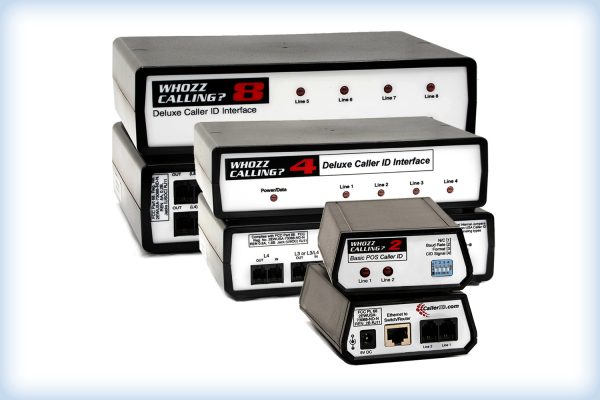
Free hardware included with subscription
(SkyTab) Caller ID connects incoming restaurant calls with the Shift4 Dine POS workflow. Staff can view caller information on the Workstation, match returning customers with existing records, and start a new ticket directly from the Caller ID screen.
(SkyTab) Caller ID connects incoming restaurant phone calls with the Shift4 Dine POS and customer database, helping staff move from answering the phone to starting an order without treating each call as a separate manual process. When a customer calls, the Caller ID screen can show the incoming phone number, the time of the call, and the phone line used. Staff can select the caller directly from the list and begin creating a new ticket from the Workstation.
For repeat customers, the restaurant Caller ID workflow becomes especially useful. Shift4 Dine can match the caller’s information with an existing customer record, giving staff access to details already stored in the Customer Database. Customer profiles can include contact information and previous orders, allowing employees to recognize returning callers and work with their existing information instead of starting from scratch each time. If the caller is new, the phone number can be carried into a new customer profile before the order is created.
The Shift4 Dine Caller ID settings also let restaurants control how incoming calls fit into their ordering process. Managers can choose how long calls remain visible in the Caller ID list, how long incoming-call notifications stay on screen, and which order type should be assigned by default when staff create a ticket from a caller. This makes the feature particularly relevant for pizzerias, takeout restaurants, delivery-focused businesses, and other operations that still receive a significant share of orders by phone.
Unlike a basic standalone caller ID display that only identifies who is calling, (SkyTab) Caller ID links caller information directly with restaurant order management. The feature works alongside the Workstation and Customer Database, helping staff move from an incoming call to a customer record and then to an active ticket inside the same POS environment. For restaurants handling frequent phone orders, it provides a practical way to organize calls, recognize returning guests, and keep telephone ordering connected with the rest of the Shift4 Dine workflow.
Bring incoming calls into the restaurant POS workflow.
Surface available customer information for returning callers.
Adds a specific operational capability to a connected restaurant POS setup.
Keeps the relevant task available where restaurant staff need it.

(SkyTab) Workstation is a fixed restaurant POS terminal for order taking, check management, payments, and day-to-day front-of-house operations. It serves as the…

Handheld+ (SkyTab Mobile) is a compact mobile restaurant POS for tableside ordering and payments. Staff can manage orders, split checks, and complete…
Powered by Google Reviews
Caller ID brings incoming calls and available customer information into the restaurant POS workflow.
This product is intended for use within the Shift4 Dine restaurant POS workflow.
Consider the service workflow, the staff role using the device, and the connected POS components already in use.
It supports a focused task within the connected Shift4 Dine POS workflow.
No. It is an accessory that supports a specific restaurant operation role.
Have questions about this product? A Shift4 Dine specialist will contact you.
Talk with a Shift4 Dine specialist about this product.
Shift4 Dine is the updated restaurant POS solution previously known as SkyTab POS. If you are searching for any of the products below, they are now part of the updated Shift4 Dine product family:


