TL;DR — What You Need to Know in 60 Seconds
- Typical kiosk hardware cost: $1,500–$7,500 per unit upfront; enterprise configs (Oracle/Micros) can run $19,000–$30,500 for two kiosks fully installed
- Shift4 Dine monthly model: Starting at $29.99 per station per month with $0 upfront hardware, per third-party industry analyses (2026)
- Biggest hidden cost: Payment processing fees — often 2.5%–2.75%+ per transaction — plus early-termination fees and annual per-device regulatory fees most vendors don’t mention in the headline quote
- Average payback period: 4–20 months depending on transaction volume, average check, and labor savings
- The real question to ask: Not “What does a kiosk cost?” but “What is my total kiosk cost per month over 24–36 months?”
“A kiosk can help a small restaurant, but only when the setup matches the menu, traffic pattern, and labor reality. The mistake is buying the big-looking unit before doing the small math.” — Max Artemenko, POS Systems Expert & Product Architect, Shift4 Dine Partners
This guide focuses on US restaurants in 2026 — QSR, coffee shops, pizza shops, and fast casual concepts. Throughout, we use Shift4 Dine as the current product name. If you’ve seen SkyTab before, that’s the former name of the same platform — Shift4 rebranded SkyTab POS to Shift4 Dine in May 2026, with the core product, interface, and feature set continuing under the new brand. Source: “Welcome to Shift4 Dine” — Shift4 release notes, 2026.
How much does a restaurant self order kiosk cost?
Restaurant self order kiosk cost has two layers: upfront spend and recurring spend. Upfront covers hardware and installation. Recurring covers software, processing, and support. Most owners focus on the first layer and get surprised by the second.
According to 2025–2026 pricing guides from Lavu and Rezku, typical kiosk hardware ranges from $1,500 to $7,500 per unit, though premium or enterprise installations can run significantly higher. — Lavu, “Self-Order Kiosk Price Guide 2025,” https://lavu.com/self-order-kiosk-price/
Lavu lists self-order kiosk pricing at $2,500–$7,500 per unit. Rezku shows $1,500–$5,000. Tabesto reports many installs land around €2,000–€2,500 installed, with premium models going higher. For Shift4 Dine specifically, third-party industry analyses show models starting at $29.99 per station per month with $0 upfront for hardware, though payment processing terms apply. Oracle/Micros-style integrated projects can go far above any of these figures when hardware, integration, and site work are bundled into a single quote. Sources: Lavu; Rezku; Tabesto; Micros Integrated Payments, “Self-Ordering Kiosks for Restaurants.”
That’s why “self ordering kiosk price” is not one number. It’s a stack.
The useful question isn’t “What does a kiosk cost?” It’s “What is the total restaurant kiosk cost per month and over 24–36 months?”
The 60-Second Kiosk Pricing Summary
Based on 2026 market data, here’s what you can expect to pay for major setups:
| Vendor / Setup | Upfront Hardware | Monthly Software | Payment Processing |
|---|---|---|---|
| Shift4 Dine | $0 upfront (included per third-party analyses) | $29.99/station | Not published; ~2.75% + $0.15 per third-party reports; Advantage Program (surcharging) available |
| Lavu | $2,500–$7,500 | Varies | Varies |
| Tabesto | €2,000–€2,500 | €40–€200/kiosk | ~0.8% of turnover |
| Square (Tablet) | $0 (use own iPad) | $0–$149 | 2.6% + $0.10 |
| Oracle/Micros (Enterprise) | $19,000–$30,500 (2 kiosks, fully installed) | Custom | Custom |
Note on Shift4 Dine processing: Shift4 does not publish official processing rates. Third-party analyses report approximately 2.75% + $0.15 per transaction, negotiable at higher volume. The Advantage Program allows surcharging card fees to guests where local law permits, which can effectively offset processing costs. Always confirm terms directly with the vendor before signing.
One-time purchase vs monthly subscription pricing
The main pricing split is simple. Some vendors push a purchase model with hardware paid upfront. Others lower the hardware entry point and recover margin through software subscription, processing, contract term, or bundled services.
Tabesto reports €40–€200 per kiosk per month plus transaction commissions, and frames ongoing software cost at roughly €1,300 per kiosk per year plus about 0.8% of turnover in one model. SeroPOS gives market examples with monthly software fees such as $34.95, $50, and $69 per device. Sources: Tabesto ROI guide; SeroPOS, “What Self-Ordering Kiosks Really Cost.”
In practice, small operators often prefer lower upfront models because cash matters more than theoretical total cost of ownership in month one. But a low entry quote can get expensive fast if the monthly stack is heavy.
In one migration project for a small counter-service operation, the owner was focused on avoiding upfront hardware spend. We mapped the real three-year cost instead of the promo price. That changed the buying decision from “cheapest screen” to “best fit for lunch volume and modifier complexity.” The result was a smaller setup with fewer surprises after launch.
What is usually included in a base kiosk quote
A base kiosk quote usually includes the screen, stand or enclosure, a payment device, and core ordering software. Some vendors also include receipt printing, basic menu management, and limited onboarding.
What changes from quote to quote is what sits outside the base line. To illustrate the upper end: comprehensive Oracle/Micros configurations for two kiosks can run $19,000–$30,500, including software licenses, API integration, staff training, and network installation. Source: Micros Integrated Payments, 2026, https://microsintegratedpayments.com/blog/oracle-micros-self-ordering/
That’s exactly why two “similar” kiosk quotes can be thousands apart.
For Shift4 Dine specifically, the kiosk module is configured in Customer Hub > Marketplace > Kiosk, per Shift4’s knowledge base. That confirms product availability and setup path. Source: Shift4 Knowledge Base / Zendesk documentation, 2026.
| Cost component | One-time | Monthly/recurring | Usually included | Common add-on |
|---|---|---|---|---|
| Kiosk hardware | $1,500–$7,500 typical market range | — | Screen, stand/enclosure | Premium enclosure, extra unit, custom mount |
| Payment device | Sometimes bundled | Sometimes tied to processing plan | EMV card acceptance | Upgraded device or replacement coverage |
| Receipt printer | Sometimes bundled | — | Basic print capability in some setups | Extra printer, paper, service |
| Kiosk software subscription | Sometimes setup fee only | €40–€200/month or $34.95–$69/device examples | Ordering interface, basic menu management | Advanced workflows, upsell prompts, loyalty integration |
| Installation | $500–$3,000+ depending on complexity | — | Basic placement in some quotes | Electrical, network drops, custom placement |
| Training/onboarding | $0–$2,000+ | — | Limited onboarding in some quotes | Staff retraining, custom menu build |
| Support/maintenance | Sometimes limited warranty only | Vendor-specific | Basic support | Priority support, hardware maintenance plan |
| Payment processing | — | Transaction-based | Card acceptance rails | Higher-rate plan, gateway-related fees |
The short version: a base quote tells you the entry point, not the full operating cost. Every line above can shift the real monthly number — sometimes by more than the hardware itself.
What drives self ordering kiosk price up or down
Self ordering kiosk price moves on four levers: hardware, software, installation, and payment-related fees. Hardware gets attention first, but software scope and service terms often decide the real bill.
Industry sources are consistent on this point. The largest price drivers are hardware complexity, software depth, integration needs, and service scope. Sources: Tabesto; Lavu; SeroPOS; Micros Integrated Payments.
Hardware type, build quality, and footprint
A countertop kiosk usually costs less than a floor-standing kiosk because it uses less enclosure material, needs less floor presence, and is easier to place. A floor-standing kiosk usually costs more because the housing, stability, and installation demands are higher.
Countertop Kiosk ✅ PROS: Lower upfront cost, uses existing counter space, faster installation, easier to relocate ❌ CONS: Takes up pickup or prep space, less visible from the entrance, limited screen real estate for complex menus
Floor-Standing Kiosk ✅ PROS: Higher visibility from the entrance, better throughput at peak hours, more professional appearance for lobby deployments ❌ CONS: Higher upfront cost, more installation work (electrical, anchoring), harder to reposition, not suitable for tight floor plans
A small coffee shop with limited counter depth should not buy a large freestanding unit just because a chain does. That’s design vanity, not operations.
In my experience, the footprint question is where many owners overspend. A kiosk that blocks pickup flow or crowds the host stand creates a new problem. The cheaper operational decision is often the one that fits the room better.
Software features, integrations, and customization
The monthly kiosk cost changes fast when software scope expands. Basic ordering is one thing. Add loyalty integration, advanced menu management, order routing to KDS, custom upsell prompts, and reporting logic — and the software bill changes.
Tabesto and SeroPOS both show that recurring software is material, not cosmetic. Sources: Tabesto pricing guide; SeroPOS comparison page.
Shift4 Dine’s broader restaurant platform matters here because the kiosk is not an isolated product. The platform supports centralized menu pricing, promotions, taxes, and order flow to the kitchen across restaurant workflows. For owners, that integration matters more than the screen itself. Source: Shift4 Dine restaurant product documentation, 2025–2026.
Want to see how the kiosk fits into a full Shift4 Dine setup? Review our special offers on Shift4 Dine — we help small restaurants deploy self-service technology with clear pricing and 24/7 support.
Installation, support, and payment-related fees
Installation can stay light or become expensive fast. The difference is placement, electrical work, network requirements, and whether the kiosk is tightly integrated into the POS and kitchen flow.
The Micros published integrated example provides a useful reference: $2,000–$3,000 for electrical, network, and physical mounting plus $1,000–$2,000 for training in one dual-kiosk deployment. Source: Micros Integrated Payments, 2026.
Payment-related fees also belong in the kiosk math. They’re not “extra” — they’re part of operating cost. Multiple pricing guides separate transaction commissions from software cost and note that some vendors offer cheap hardware to lock in proprietary processing at elevated rates. A practical rule: always ask what the effective per-transaction cost will be at your expected monthly card volume, not just the headline rate. Sources: Tabesto; SeroPOS; Kiosk Industry white paper.
Fees eat margin. That’s not a metaphor — it’s a line item.
Kiosk cost by type: tablet, countertop, floor, and table kiosk
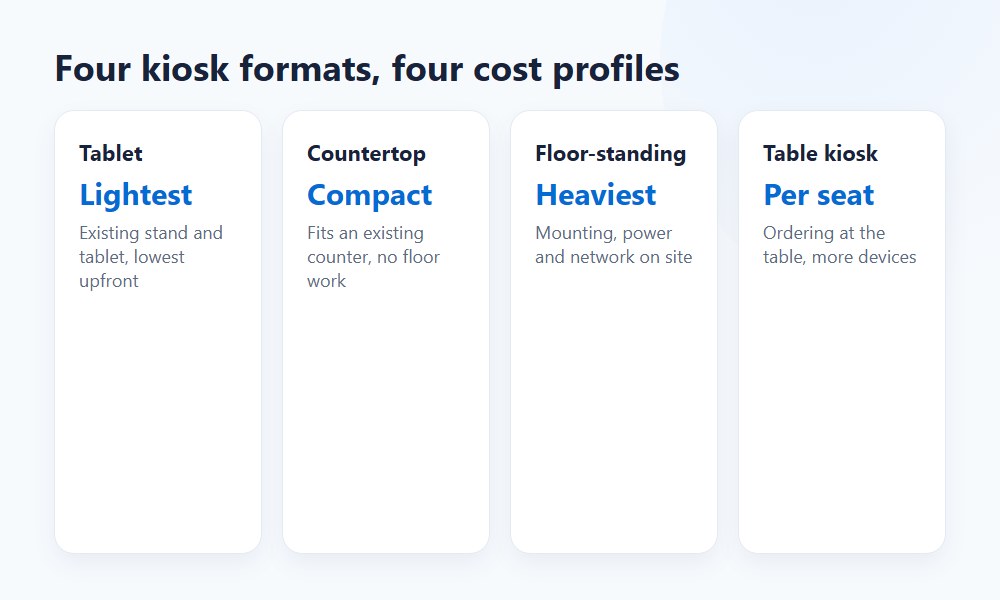
Kiosk cost by type follows a practical hierarchy. Mounted tablet systems are usually the lowest-cost entry. Countertop kiosk setups sit above them. Floor-standing kiosks cost more. Table kiosk use cases can work, but they’re not ideal for every small QSR or fast casual concept.
Choose by traffic pattern, not aesthetics.
Countertop kiosk vs floor-standing kiosk cost
A countertop kiosk generally costs less than a floor-standing kiosk. The reason is simple: smaller enclosure, less placement work, and a lower physical footprint.
A floor-standing kiosk usually makes more sense when traffic volume, lobby layout, and self-order share justify it. If the dining room or front zone can absorb the unit cleanly, the extra spend may pay off. If not, it becomes an expensive obstacle.
For a small restaurant, the countertop vs floor kiosk cost decision should start with peak-hour order volume. If one compact unit can absorb enough orders without disrupting pickup, that’s usually the smarter first deployment.
Mounted tablet systems and table kiosk setups
Mounted tablet systems are often the cheapest entry point for a self order kiosk for small restaurant use.
Tablet / Mounted System ✅ PROS: Lowest upfront cost, uses existing hardware (iPad), fast setup, easy to reposition ❌ CONS: Less durable under heavy use, smaller screen limits modifier-heavy menus, lower perceived quality
Table Kiosk ✅ PROS: Good for hybrid or dine-in concepts, reduces server steps, enables upsell at the table ❌ CONS: Higher per-unit cost at scale, cleaning and maintenance overhead, not suitable for pure counter-service operations
| Format | Footprint | Hardware needs | Typical use case | Approx. hardware cost range | Main cost drivers |
|---|---|---|---|---|---|
| Tablet / mounted system | Small | Tablet, mount, payment device | Entry-level self ordering in tight spaces | $500–$2,000 | Device quality, mount, integration |
| Countertop kiosk | Medium | Screen, stand, payment device, optional receipt printer | QSR, coffee, pizza, fast casual front counter | $1,500–$5,000 | Enclosure, printer, software, support |
| Floor-standing kiosk | Large | Full enclosure, larger stand, payment device, optional printer | Higher-traffic lobby or multi-kiosk ordering zone | $3,000–$7,500+ | Build quality, install, placement, service |
| Table kiosk | Tabletop | Small device, table power/charge considerations | Dine-in or hybrid service models | $800–$2,500/unit | Device count, charging, cleaning, replacement |
Summary: if the goal is affordable self-service for a small restaurant, mounted tablet and countertop kiosk setups are usually the first two formats to price seriously. Table kiosks make sense for dine-in concepts with strong upsell potential — but they add per-unit cost fast at scale. Floor-standing units are worth the investment when lobby traffic and throughput genuinely justify the footprint.
What hardware is included in kiosk pricing
Kiosk hardware usually includes four core elements: screen, stand or enclosure, payment device, and sometimes a receipt printer. Everything beyond that depends on the vendor architecture and how tightly the kiosk connects to the POS.
This is where specialized POS hardware for restaurants stops being a generic term and starts affecting real operations.
Core components: screen, stand, payment device, and printer
A basic self-service kiosk for restaurants needs a customer-facing screen, a secure mount or enclosure, and a payment device. A receipt printer may be included when printed proof is operationally useful, but not every setup needs one.
The Kiosk Industry white paper gives a concrete bundled example: an under-$8,000 initial location investment in one Nanonation/Samsung/Clover case, plus ongoing monthly kiosk and device fees. Source: Kiosk Industry, “Elevating Restaurant Finances,” 2024.
For small QSRs, the payment device matters as much as the screen. If the tap, insert, and retry flow is clumsy, customer adoption drops — and that’s a real number you feel in throughput, not just in reviews.
POS-integrated kiosk vs standalone setup
A POS-integrated kiosk is usually better operationally than a standalone setup. Orders flow into the same menu logic, payment environment, and kitchen routing as the rest of the business.
Standalone kiosks can look cheaper at first. But they often create friction in menu management, reporting, and order routing. In restaurant operations, that friction costs labor — and in our experience, the hidden time cost of manually transferring tickets from a standalone kiosk to the main POS typically runs 1–3 labor hours per week in a busy counter-service operation. That’s $50–$150/week in labor you didn’t budget for.
Shift4 Dine’s product logic supports the integrated model. The platform ties restaurant ordering, menu control, and kitchen flow together rather than treating the kiosk as a separate island. Sources: Shift4 Dine product pages; Shift4 Zendesk kiosk setup documentation.
Software, integrations, and monthly restaurant kiosk cost
Restaurant kiosk cost per month varies because vendors price software very differently. The big factors are features, support scope, and how the kiosk integrates with menu management, kitchen routing, loyalty, and reporting.
This is why one vendor can show a low hardware number and still end up expensive over time.
Features that affect monthly fees
Monthly fees usually rise when you add advanced ordering workflows, loyalty integration, customization, reporting layers, and stronger support. Upsell prompts also belong here — they’re not just UX decoration, they’re revenue logic.
Tabesto and SeroPOS both confirm that software subscription and support are meaningful recurring costs, not side notes. Source: Tabesto, 2025; SeroPOS, 2026.
From an operations angle, what matters more than “how many features” is “which features prevent rework.” Good menu management and clean upsell prompts can add revenue without slowing the customer. A bloated feature set that nobody configures correctly does the opposite.
“A kiosk earns its keep when the software is disciplined. Clean modifiers, clear prompts, and predictable order flow matter more than flashy UI.” — Max Artemenko, POS Systems Expert & Product Architect, Shift4 Dine Partners
How kiosk orders flow to POS and kitchen
Kiosk orders should move from the guest screen into the POS and then to the kitchen without manual cleanup. If that flow is weak, labor savings disappear.
Shift4 Dine’s restaurant materials confirm direct order routing to kitchen workflows in its broader platform. That matters because self-service only works when the back-of-house kitchen display screens receive clean tickets fast. Source: Shift4 Dine restaurant documentation, 2025–2026.
In one quick-service menu cleanup project, modifier logic was causing avoidable kitchen confusion before self-ordering was added. We simplified the item structure first. Then kiosk ordering made sense. The result was fewer correction calls from expo and cleaner ticket flow during peak periods. The order routing to KDS worked because the menu was clean — not because the hardware was expensive.
Installation, onboarding, and maintenance costs to plan for
Installation and maintenance costs are easy to underestimate. They rarely look dramatic in a sales conversation, but they shape the first 90 days of whether the kiosk feels helpful or annoying.
For small restaurants, this section matters as much as the hardware line item.
What affects installation cost by placement
Placement drives installation cost. A freestanding unit often needs more planning and more site work than a countertop or mounted kiosk.
The Oracle/Micros-style integrated deployment — where site work and mounting added thousands to the location budget — illustrates the upper range. That’s an enterprise-style reference, not a default small-store number, but the logic holds: placement complexity raises cost. Source: Micros Integrated Payments, 2026.
Countertop and tablet-based kiosks are usually easier to launch because they ask less from the room. No electrical runs, no floor anchoring, no network drops in new locations. That’s real money saved before the first order goes through.
Ongoing support, updates, and hardware service
Ongoing support is part of total cost of ownership. Software updates, failed peripherals, damaged screens, and replacement timelines all affect the real kiosk ROI restaurant owners care about.
Shift4 Dine’s platform confirms 24/7 technical support and onsite installation and service through certified technicians. Sources: Shift4 official support and product materials.
That support matters more than people think. A broken kiosk on a Friday dinner rush is not a theory problem. It’s a floor problem.
“Service is not just a line in a contract. Having technicians who will come the next day, and 24/7 support available around the clock, is critical for uninterrupted operations.” — Max Artemenko, POS Systems Expert & Product Architect (source: verified client reviews, Trustpilot)
Real operators confirm this. One client review of a Shift4 Dine setup notes: “I really love that they have real technicians that come to assist next day. And their customer service is excellent 24/7. I always get an answer and a follow up.” — verified client review, Trustpilot.
Compliance and security costs that should not be skipped
Compliance and security costs should be budgeted from the start. They’re not optional trim. ADA accessibility, payment security, and practical privacy measures affect both usability and risk.
Disclaimer: The information in this section regarding ADA requirements and payment security is general in nature and intended for informational purposes only. It does not constitute legal advice and does not replace a formal accessibility audit, compliance review, or legal consultation for your specific location and configuration.
ADA accessibility should be part of the selection conversation early. For a small restaurant, that means asking basic questions about reach range, screen height, visibility for guests in wheelchairs, and usability for guests with different needs. These considerations can affect hardware choice, placement, and sometimes installation scope. Skipping this conversation until after the hardware is installed is a common and avoidable mistake.
Payment security has a real cost footprint. Secure payment device selection, clean mounting practices, and tamper-aware hardware are part of the kiosk decision. Skipping them to save money is usually false economy — a compromised payment device creates liability and guest trust problems that cost far more than a better-specified device upfront.
Privacy screens are worth mentioning here too. In high-traffic or open-floor setups, a screen visible to other guests during payment entry is a real concern — not a theoretical one. Some vendors include privacy filters; others treat them as add-ons. Ask before you sign.
Even where hard cost adders cannot be confirmed from the available research data, operationally all three — ADA accessibility, payment security, and privacy screens — belong in every quote review. They’re not compliance theater. They’re part of running a professional operation.
Hidden costs vendors leave out of restaurant kiosk quotes
The most common problem with restaurant kiosk quotes is not that the vendor lies. It’s that the quote frames the cheapest visible layer first. The Shift4 Dine free hardware model is one example worth understanding before you sign — what looks like $0 upfront is funded through processing and contract terms. That’s not necessarily bad, but you need to know the math before you commit.
Hidden costs usually sit in processing, support tiers, installation, customization, extra peripherals, and recurring software.
Included vs add-on costs
Included vs add-on costs should be clarified line by line before signing. Assume nothing.
Industry sources repeatedly show omitted or lightly disclosed items such as:
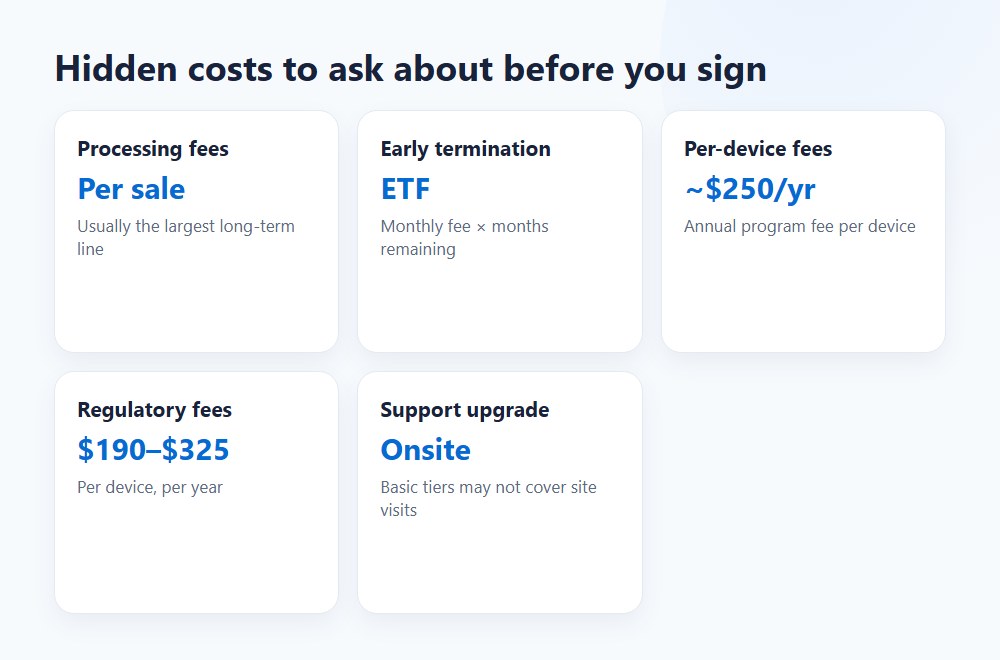
- Payment processing fees — often 2.5%–2.75%+ per transaction
- Early-termination fees — Shift4 Dine, for example, has a documented ETF equal to the total monthly service fee multiplied by remaining months on the 36-month agreement
- Annual per-device regulatory fees — third-party reports cite a program fee of approximately $250 per device (capped at $1,000) plus a $190–$325 regulatory fee per device per year for Shift4 Dine
- Support tier upgrades — basic support may not include priority response or onsite service
- Integration and customization work — not typically included in base quotes
- Printer and peripheral maintenance — paper, service contracts, replacement devices
Sources: Tabesto; Micros Integrated Payments; SeroPOS; Kiosk Industry white paper; third-party industry analyses of Shift4 Dine pricing.
Yes, this is a long list. That’s the point.
Quote clarity and contract questions to ask
Quote clarity matters more than the headline number. Ask what triggers a higher monthly fee, what support is included, what happens if hardware fails, how payment fees are structured, and what the early-termination penalty is.
Vendor Quote Review Checklist:
- Is the payment device included or add-on?
- Is the receipt printer included or optional?
- Is installation basic or custom (electrical, network, anchoring)?
- Is menu management setup and onboarding included?
- Are software updates included in the monthly fee?
- Is technical support limited hours or 24/7 priority?
- Are payment processing terms fixed, negotiated, or volume-based?
- What are the early-termination fees and conditions?
- Are there annual per-device fees (regulatory, program, or compliance)?
- What happens if one kiosk fails during service — how quickly can it be replaced?
- Is there an offline mode if internet connectivity drops?
This checklist applies to any vendor. For Shift4 Dine specifically, confirm the kiosk setup path and integration scope through the current platform workflow in Customer Hub before signing. Source: Shift4 Zendesk kiosk documentation, 2026.
Is a self-service kiosk worth it for restaurants?
A self-service kiosk is worth it when it lifts average check size, absorbs ordering volume, and lets labor shift to higher-value work. It’s not worth it when traffic is too low, menu flow is broken, or the setup is oversized for the restaurant.
The available ROI examples rely heavily on two levers: labor savings and higher average checks. Monterra’s worked example uses a $30,400 two-kiosk install, a 6% lift on captured counter sales, and eight net labor hours saved per week to estimate a payback period of about 20 months.
“Monterra’s model shows that with two kiosks installed at $30,400 and 8 labor hours saved per week, payback is reached in approximately 20 months.” — Monterra, “Restaurant Kiosk Cost and ROI: The Payback, Worked,” 2026, https://monterrafs.com/restaurant-kiosk-cost-and-roi/
Where ROI usually comes from
Kiosk ROI restaurant math usually comes from labor reallocation, upsell prompts, throughput gains, and average check improvement. “Labor savings” doesn’t always mean cutting headcount. Often it means moving staff from order entry to pickup, guest help, or production support.
In real operations, kiosks often improve consistency more than they slash payroll. They can still pay back well if average check size improves and peak-hour order flow gets smoother. The upsell prompts are where the money actually shows up — a clean “add a drink?” prompt at the right moment in the order flow consistently outperforms a cashier asking the same question under pressure during a lunch rush.
Tabesto’s ROI materials and Monterra’s worked model both support the idea that upselling and labor effects drive the business case. Sources: Tabesto ROI guide; Monterra, 2026.
How to work out payback period
Work out payback period with a simple formula:
Payback Period = Total Upfront Cost ÷ Net Monthly Benefit
Where: Net Monthly Benefit = (Monthly Check Lift × Contribution Margin) + Labor Reallocation Value − Monthly Recurring Kiosk Cost
Practical example for a small fast casual restaurant:
| Item | Amount |
|---|---|
| Upfront hardware + installation | $4,500 |
| Monthly software/support/processing recurring cost | $150/month |
| Monthly kiosk transactions | 1,200 |
| Current average check | $18 |
| Average check lift from upsell prompts | 5% |
| Gross incremental monthly sales | $1,080 |
| Contribution after food cost (65%) | $702 |
| Labor reallocation value | $500/month |
| Total monthly benefit | $1,202 |
| Less monthly recurring kiosk cost | $150 |
| Net monthly benefit | $1,052 |
| Estimated payback period | 4.3 months |
That’s only one example. Change the transaction count or check lift and the answer moves fast. At 400 kiosk transactions per month with the same setup, the payback period extends to over a year. The math is sensitive to volume — which is exactly why a kiosk that makes sense for a busy lunch counter may not make sense for a low-traffic dinner-only concept.
Reliability matters too. According to 2026 user reviews on Capterra and G2, kiosk systems with offline modes and 24/7 in-house support score highest for operational reliability — especially during lunch and dinner rush periods when a failed kiosk is most damaging to throughput.
Best-fit kiosk budgets for small restaurants, fast casual, and multi-location brands
The right kiosk budget depends on the smallest setup that can handle the busiest hour. Small restaurants should not start with enterprise architecture. Fast casual concepts with stronger lunch volume can justify more structure earlier.
That’s usually the difference between a smart rollout and an expensive toy.
Self order kiosk for small restaurant
A self order kiosk for small restaurant use should usually start lean. Think countertop kiosk or mounted tablet-style setup, tight menu management, and strong POS integration.
The research base supports this direction. Small restaurants are the most price-sensitive and often fit the leanest entry setup best, while higher-volume fast casual brands can justify deeper integration and more upfront spend. Sources: Lavu; Rezku; SeroPOS; Monterra.
In several small-store rollouts, the best first move was not “add more screens.” It was “make one screen work well during the busiest hour.” That keeps cost in line and exposes operational issues before scaling. One screen that handles 80% of peak-hour orders cleanly is worth more than two screens that confuse the kitchen.
For a small restaurant exploring the Shift4 Dine kiosk, the countertop format is usually the right starting point — lower upfront exposure, easier placement, and the same POS integration as a floor-standing unit.
Fast casual and higher-volume rollout planning
Fast casual and higher-volume concepts should budget based on throughput, not just unit price. If the restaurant regularly hits a real lunch crush, one kiosk may not be enough even if the hardware price looks attractive.
This is also where scalability matters. If the concept may add locations, menu governance, reporting, and support discipline become part of kiosk value. A system that works cleanly at one location but breaks down at five is not a scalable investment — it’s a recurring problem.
For multi-location operators, the Shift4 Dine QSR platform supports centralized menu control and reporting across locations — which matters more than it sounds when you’re managing modifiers and pricing across a growing footprint.
Start with the smallest kiosk setup that fits your busiest hour. Then scale from proof, not assumption.
How to choose the right restaurant kiosk solution for your budget
Choose the right kiosk solution by matching three things: your peak-hour flow, your menu complexity, and your tolerance for recurring fees. Price matters, but operations fit matters more.
Questions to answer before requesting quotes
Before asking for quotes, define your basics:
- How many orders should the kiosk absorb at peak hour?
- Is the menu simple or modifier-heavy?
- Do you need a receipt printer?
- Is the front counter tight or open?
- Do kiosk orders need direct routing to a KDS?
- Do you want loyalty integration from day one?
- Is your budget upfront-heavy or monthly-sensitive?
- Are you comfortable with a 36-month processing commitment in exchange for $0 hardware?
For Shift4 Dine specifically, confirm the kiosk setup path and integration scope through the current platform workflow in Customer Hub. Source: Shift4 Zendesk kiosk documentation, 2026. And if you want to see current Shift4 Dine pricing before you request a formal quote, that’s a reasonable first step.
How to compare vendors without focusing only on price
Compare vendors on total cost of ownership, support quality, integration depth, and quote transparency. Do not compare only on the cheapest headline hardware price.
The strongest message from those sources is exactly that: the lowest visible price is often a poor proxy for the real cost. Sources: Tabesto; Lavu; SeroPOS; Micros Integrated Payments.
For a restaurant looking at Shift4 Dine, compare:
- Hardware format fit for your floor plan
- Software scope and feature set
- Monthly kiosk software subscription fee
- Payment processing model and effective per-transaction rate
- Support coverage (24/7 vs business hours, remote vs onsite)
- Installation scope and timeline
- Long-term reporting and menu control capabilities
- Early-termination terms and annual device fees
A live demo also matters — not for the sales pitch, but for the friction points. Build one real order, with modifiers, payment, and kitchen routing. That tells more than a brochure. If the demo flow is clunky, the service floor will be worse.
Ready to talk through a specific setup? Contact Shift4 Dine Partners — we work through the numbers with you before you sign anything.
Sources used in this guide
- Shift4 release notes, “Welcome to Shift4 Dine,” 2026
- Shift4 Zendesk documentation on kiosk setup via Customer Hub > Marketplace > Kiosk
- Tabesto, 2025 pricing and ROI guides
- Lavu, “Self-Order Kiosk Price Guide 2025,” https://lavu.com/self-order-kiosk-price/
- Rezku, “How Much Does a Restaurant Self-Service Kiosk Cost?”, 2025
- SeroPOS, 2026 comparison page
- Micros Integrated Payments, “Self-Ordering Kiosks for Restaurants,” 2026, https://microsintegratedpayments.com/blog/oracle-micros-self-ordering/
- Monterra, “Restaurant Kiosk Cost and ROI: The Payback, Worked,” 2026, https://monterrafs.com/restaurant-kiosk-cost-and-roi/
- Kiosk Industry white paper, “Elevating Restaurant Finances,” 2024
- Third-party industry analyses of Shift4 Dine / SkyTab pricing (RestaurantTools.ai, 2026)