TL;DR: KDS software typically runs $15–$80 per screen per month. Hardware spans $150–$2,500+ per unit. First-year total cost can range from under $400 to over $20,000, depending on screen count, routing complexity, and whether the system is bundled with your POS. Scroll to the section that matches your kitchen size, or use the table below to orient quickly.
“In real restaurant installs, KDS pricing only looks simple on the first quote. The real number depends on how many stations need their own view, whether expo needs a separate screen, and how clean the order routing is from day one.” — Max Artemenko, POS Systems Expert & Product Architect
If paper tickets are slowing the line down, a KDS can be worth the cost. The catch is that “KDS price” can mean three different things: the screen itself, the monthly software, or the full setup with mounting, routing, training, and backup devices. This guide breaks all three apart so you can budget accurately before the first quote arrives.
A quick note on product naming: Since May 12, 2026, SkyTab POS has been officially renamed Shift4 Dine — same product, same hardware, same operating logic. Older materials may still reference SkyTab. What restaurant owners need to know about this transition is that all pricing, support, and device specs carried over unchanged per Shift4 release notes, Welcome to Shift4 Dine, 2026.
Quick KDS Brand Comparison Table
Before diving into cost breakdowns, here is how the major KDS platforms compare at a glance. Use this to orient your research — then read the sections below to understand what each number actually includes.
| KDS Brand / Model | Monthly Software | Hardware Cost | Best For |
|---|---|---|---|
| Shift4 Dine (bundled) | ~$29.99/station (POS platform) | $0 upfront (on processing agreement) | New restaurants, bars, pizzerias comfortable with processor lock-in |
| Toast | $0–$165+/mo | $0–$799+ | Full-service restaurants, multi-location groups |
| Square for Restaurants | $0–$149/mo | $0 (own iPad) | Cafés, QSR, food trucks, pop-ups |
| Lightspeed | $69–$399+/mo + $30/screen/mo KDS | $399+ (iPad kit) | Upscale restaurants, hotels, multi-concept groups |
| Fresh KDS (standalone) | $20–$27/screen/mo | $300–$800 (BYO hardware) | Any kitchen needing standalone routing |
| SpotOn | $0–$55/station/mo | $0 (All-In) or $375+ | Full-service restaurants, bars, breweries |
Note on Shift4 Dine pricing transparency: While the base platform is advertised at $29.99/month per station, operators should account for mandatory Shift4 payment processing (third-party reports cite ~2.75% + $0.15 per transaction), plus annual per-device fees — reportedly a program fee around $250/device and a $190–$325 regulatory fee per device per year (figures vary because Shift4 does not publish them officially). The headline number is real; the total cost of ownership is higher. See the hidden fees and payment processing lock-in section below.
What a restaurant kitchen display system includes and why cost varies
A restaurant kitchen display system usually includes more than a screen. The price varies because some vendors sell KDS as part of the POS, some sell it as an add-on, and others price it as a separate kitchen platform entirely.
At minimum, a kitchen display system for restaurant use includes a KDS screen, software, and order routing from the POS. In many kitchens, it also includes an expo screen, mounting hardware, cabling, implementation, and a kitchen printer backup for failure contingency or mixed workflows. That is why one quote can look like a cheap tablet subscription and another can look like a full commercial kitchen deployment.
The broad market ranges are wide. According to a 2025 market report:
“A cloud KDS for one QSR location with 3–4 stations typically lands at $2,500–$8,000 in hardware and $50–$300 per month per location in software, while more complex multi-location rollouts can reach $5,000–$25,000 per location including services.” — Kitchen Display System Market Research Report 2034, DataIntelo, 2025. https://dataintelo.com/report/kitchen-display-system-market
A second practical benchmark gives the outer edges of ownership cost:
“First-year KDS ownership can range from under $400 to over $20,000, depending on form factor, software, and installation.” — Kitchen Display System Price Guide: KDS Cost in 2026, TCANG, 2026. https://www.tcang.net/kitchen-display-system-price-guide.html
Core KDS components: screens, routing, and workflow
The core KDS cost drivers are the screens and the workflow logic behind them. If the kitchen only needs one visible queue, cost stays low. If orders must be split by grill, fry, pizza, pantry, and expo, cost rises fast.
A working kitchen screen system usually includes:
- one or more KDS screen units
- an optional bump bar or touch workflow
- order routing by station
- prep timers
- all-day counts
- ticket times for production visibility
- a final expo screen for assembly and handoff
In Shift4 Dine, the official device specs confirm 16-inch and 22-inch SkyTab Kitchen Display System hardware options. That matters because screen size changes readability, mounting options, and station fit.
From implementation experience, the kitchen layout matters more than the menu size alone. A compact sandwich shop can run cleanly on one screen. A pizza kitchen with ovens, salad, cut table, and pickup flow often needs separate routing and at least one expo view.
Case: fast-casual kitchen, single-screen setup. A small fast-casual kitchen tried to run all tickets on one screen. We split routing into line production and expo visibility. Result: fewer missed modifiers and less verbal back-and-forth during peak periods.
Text version: POS sends orders → routing rules split tickets by station → line screens show active prep → expo screen consolidates → backup printer handles contingency.
Why one KDS quote can be much higher than another
One KDS quote is higher than another because the vendor may be pricing a different category of product entirely. A bundled KDS, a POS add-on, and a standalone platform do not have the same cost structure — and that gap is wider than most operators expect.
- Bundled with POS: some KDS cost is absorbed into the broader POS deal, subsidized by processing fees
- POS add-on: the kitchen module is priced on top of the POS subscription, often per screen
- Standalone KDS platforms: separate software, separate hardware logic, separate implementation — and usually the highest monthly rate
Hardware type also drives the gap. A consumer-grade tablet running KDS software costs $150–$400. A commercial kitchen display built for heat, grease, and 16-hour days costs $900–$2,000+. Same function on paper. Very different durability in a real line environment.
Then there is installation and training — two line items that rarely appear in the headline quote. A system that costs $20/month per screen can still require $500 in professional installation and two hours of staff training before it runs clean. That is not a hidden cost. It is just a cost that vendors prefer not to lead with.
Support and maintenance round out the picture. A $20/screen/month subscription with self-serve support only is a different product than a $50/screen/month plan with a real support line. When something breaks on a Friday night at 7 PM, that difference is not abstract.
How much a KDS typically costs per screen and per location
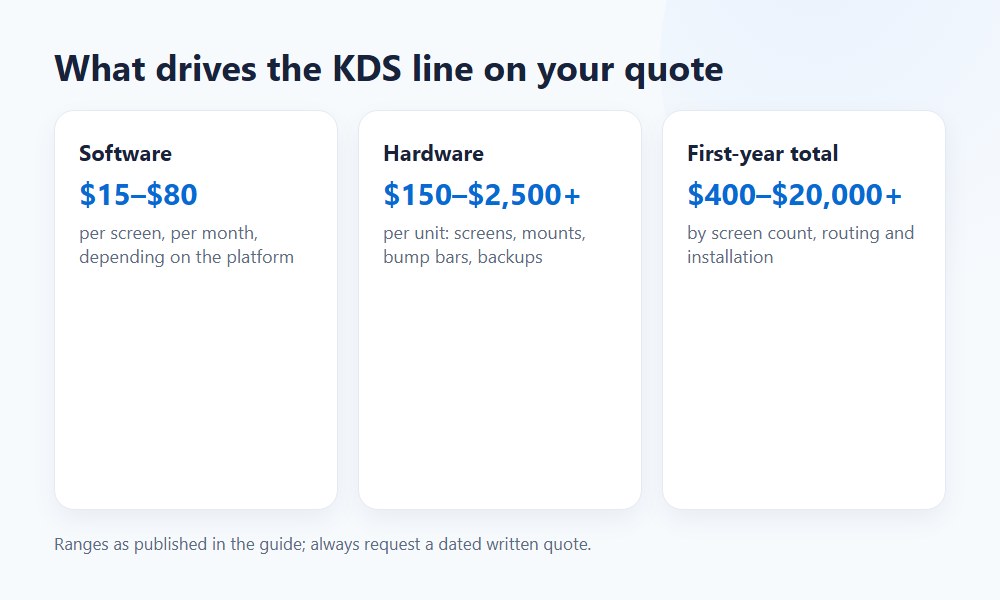
A realistic 2026 answer: KDS software often runs $15–$80 per screen per month, while hardware can range from $150 to $2,500+ per unit depending on whether it is entry-level tablet hardware or a commercial kitchen display. Full location cost depends on how many stations need their own view.
That means the true restaurant kitchen display system cost can start as a low monthly add-on for a one-screen kitchen and move into several thousand dollars when the kitchen needs multiple routed stations, commercial mounting, and implementation.
Bundled, POS add-on, and standalone KDS pricing tiers
The easiest way to understand kitchen display system price is by tier. The hardware number alone is not enough.
Fleksa’s 2026 guide summarizes that gap clearly:
“KDS software can be $0 per month when bundled with a POS, $30–$200 per month per kitchen station as a standalone add-on, or $5–$30 per month per terminal as a POS upgrade.” — Kitchen Display System (KDS) Cost in 2026, Fleksa, 2026. https://fleksa.com/en/cost/kitchen-display-system
| Pricing model | Typical hardware cost per screen | Typical software subscription | Typical setup items |
|---|---|---|---|
| Bundled with POS | $0–$500 | $0–$30/month per screen | Basic routing, standard mount, limited onboarding |
| POS add-on | $150–$900 | $15–$80/month per screen | Menu mapping, routing rules, training, support |
| Standalone KDS platform | $400–$2,500+ | $30–$200/month per station | Integrations, network setup, commercial mounts, professional services |
Bundled with POS (e.g., Shift4 Dine, Toast) Pros: $0–$30/month per screen; seamless order routing out of the box; single vendor for support. Cons: Tied to specific payment processor; hardware lock-in; limited routing customization on entry tiers.
POS Add-On (e.g., Square KDS, Lightspeed KDS at $30/screen/mo) Pros: Clear per-screen pricing; scales with station count; often more routing flexibility. Cons: Setup and integration cost extra; support may involve two vendors.
Standalone KDS Platform (e.g., Fresh KDS, Otter) Pros: Works with multiple POS systems; deepest routing control; best for mixed or legacy environments. Cons: Highest monthly cost per station; separate implementation; more failure points.
For more detail on hidden costs in Shift4 Dine, including what bundled pricing actually covers, review the full fee breakdown before signing.
Startup costs are also a real line item. Forcked notes:
“Installation can run $200–$500 in some systems, with 2–3 hours of staff training included in the startup budget.” — Best Kitchen Display Systems, Forcked, 2025. https://forcked.com/best-kitchen-display-systems-2026
Estimating total cost for one-screen vs multi-screen kitchens
| Kitchen format | Typical screen count | Common layout | Budget logic |
|---|---|---|---|
| One-station kitchen | 1 screen | Single line or compact prep | Lowest KDS cost; often fits bundled or add-on model |
| Line + expo | 2 screens | One production screen + one expo screen | Better visibility; modest bump in software and mounting |
| Multi-station kitchen | 3–5 screens | Grill, fry, pantry, pizza, expo | Cost rises with routing complexity and support needs |
For a very small setup, Otter estimates a single-screen system can land at $440–$1,320 in year-one cost once hardware, mounting, and support are included. Source: How Much Does a KDS System Cost?, Otter, 2026.
For a more advanced kitchen, DataIntelo’s data shows a 3–4 station QSR location often reaches $2,500–$8,000 in hardware before recurring software. That is a significant jump, but it tracks with what happens when each production area needs its own routed view.
The biggest mistake in planning is buying for menu size instead of ticket flow. Ten menu categories do not always mean three screens. But split stations, heavy modifier volume, and mixed online orders usually do.
TCO Comparison: 3-Year Total Cost of Ownership
The monthly software rate alone does not tell you the real story. A “cheap” $20/screen/month subscription can cost more than a premium $80/screen/month system over 36 months once hardware replacement, support gaps, and integration friction are included.
Here is a practical framework for a two-screen kitchen over 36 months:
| Cost element | Low-cost tier ($20/screen/mo) | Mid-tier ($50/screen/mo) | Premium tier ($80/screen/mo) |
|---|---|---|---|
| Software (36 mo, 2 screens) | $1,440 | $3,600 | $5,760 |
| Hardware (2 screens) | $300–$800 | $600–$1,800 | $1,200–$5,000 |
| Installation | $0–$200 | $200–$500 | $500–$1,000 |
| Support/training | Minimal or DIY | Included or low cost | Full onboarding |
| Estimated 3-year total | $1,740–$2,440 | $4,400–$5,900 | $7,460–$11,760 |
The takeaway: a low-cost subscription on consumer-grade hardware in a hot line environment may require replacement in year two, erasing the savings. A premium commercial system often has a better 36-month ROI for high-volume kitchens.
Hidden fees and payment processing lock-in
This is the section most KDS guides skip. It is also the section that most often determines whether a “great deal” stays a great deal after month six.
Payment processing lock-in: the real hidden cost of bundled KDS
When a KDS is bundled with a POS — especially a system like Shift4 Dine — the low monthly software rate is subsidized by mandatory payment processing. That means your “free” or cheap KDS is not actually free. It is priced into every card swipe for the length of your contract.
Here is what that means in practice:
Shift4 Dine: $29.99/month per station is the published software rate. But Shift4 requires mandatory processing through their network on a standard 36-month agreement. Third-party analyses report rates of approximately 2.75% + $0.15 per transaction — not published officially by Shift4. A restaurant processing $20,000/month in cards pays roughly $550/month in processing fees alone, plus annual per-device fees ($250 program fee + $190–$325 regulatory fee per device per year per third-party reports). Over 36 months, that small café example from a Shift4 partner analysis adds up to roughly $22,000 all-in — far more than the $29.99 headline suggests.
Toast: Hardware costs $0–$799+ depending on tier, but processing is non-negotiable at 2.49%–2.99% + $0.15 on lower plans.
Square: Flat-rate 2.6% + $0.15 in-person, with no long-term contract — more transparent, but rates are higher than negotiated interchange-plus at volume.
The rule: the cheaper the KDS bundled rate, the more carefully you should read the processing agreement. A system priced at $0/month upfront with mandatory processing can be the most expensive option for a high-volume restaurant.
“The quote that wins is rarely the one with the lowest screen number. It’s the one that shows routing, support, backup, and the real monthly cost in writing.” — Max Artemenko, POS Systems Expert & Product Architect
According to 2026 Capterra reviews, Shift4 Dine scores 4.7/5 for ease of use — but users consistently cite processing lock-in and billing complexity as the primary hidden cost to understand before signing. (Source: Capterra, 2026.)
Other hidden costs operators miss
Beyond processing fees, the typical KDS budget underestimates:
- Annual per-device fees: On bundled systems, expect $250–$325/device/year in platform and regulatory fees (varies by vendor, often not published upfront).
- Integration fees: If orders come from multiple channels — dine-in, phone, direct online, and third-party aggregators — setup gets more complex and often more expensive.
- Support tiers: A $20/screen/month subscription that comes with self-serve support only can cost more operationally when something breaks on a Friday night.
- Early termination: On 36-month contracts (Shift4) or 24-month contracts (SpotOn All-In), leaving early triggers fees equal to the monthly service fee multiplied by remaining months, plus potential hardware recapture.
What affects restaurant kitchen display system cost the most
The biggest KDS cost drivers are screen count, hardware grade, software subscription, integration scope, and implementation. If one of those goes up, total cost usually follows.
There is no honest fixed national average that applies to every restaurant. The right question is not “what is the KDS price?” but “what will this kitchen actually need to run clean during rush?”
Screen count, screen size, and commercial-grade durability
More screens increase both upfront and recurring cost. Screen size and commercial durability can also change ROI significantly if the kitchen environment is hot, greasy, or hard on equipment.
The broad hardware band runs $150–$2,500+ per unit, with one 2026 guide splitting the market into $150–$400 entry hardware, $400–$900 mid-range commercial units, and $900–$2,000+ all-in-one commercial systems. Source: Kitchen Display System Price: 2026 Restaurant KDS Guide, TCANG, 2026.
For Shift4 Dine specifically, the official device list includes SkyTab Kitchen Display System in 16-inch and 22-inch options. That gives a useful planning rule:
- 16-inch vs 22-inch display: 16-inch often works for tight prep zones. 22-inch is easier to read at expo or at stations with higher ticket density.
- Heat and grease resistance: kitchens punish consumer hardware. Cheap screens fail sooner in greasy line environments.
- KDS monitor placement: if the mount forces awkward viewing angles, staff still miss tickets regardless of screen size.
Case: bar kitchen, hardware placement. A bar kitchen wanted the cheapest tablet-style display by the fryer. We moved that station to a more protected mount and kept the larger, more durable screen at expo. Result: lower hardware exposure and better readability where the ticket stack actually mattered.
Software, integrations, and support costs
Software subscription is often the hidden cost that turns a cheap KDS into a medium-cost one. Integrations and support can add more than the hardware difference.
Recurring fees are a major driver across the market. Otter lists $20–$80 per screen/month. Katalyst lists $15–$35 per screen/month. Fleksa notes that some systems price by kitchen station rather than by screen. That distinction matters when one location has line routing, an expo screen, and online order integration.
For Shift4 Dine, the broadly cited rate is $29.99 per month per terminal for the POS platform. That is the POS platform rate, not a published KDS-only price. Always request a written, dated quote — and make sure the quote separates POS software from KDS module costs from processing fees.
“KDS pricing should always be dated and tied to a written quote. Vendors change bundles, promo terms, and what counts as included support.” — Max Artemenko
Data freshness note: KDS prices depend on vendor pricing, bundle structure, hardware choice, and quote date. All ranges in this article are 2026 planning benchmarks, not fixed offers.
Hardware costs: screens, mounts, bump bars, and backup devices
Most KDS hardware budgets include more than the display. Expect to pay for the screen, the mount, cabling, possible input hardware, and often one backup device path. That is where many “cheap KDS” offers stop being cheap.
Tablet-based KDS vs commercial screens
A tablet-based KDS is usually cheaper upfront. A commercial kitchen screen is usually more stable long term in heat, grease, and high-hour environments.
TCANG’s 2026 pricing guide supports this split with entry hardware at $150–$400, mid-range commercial at $400–$900, and high-end setups at $900–$2,000+. A separate guide notes $499 per screen in one buying example and $300–$800 per screen for BYO hardware scenarios. Sources: TCANG, 2026 and Forcked — Kitchen Display System Buying Guide, 2025.
Practical trade-off:
- Tablet-based KDS: lower entry cost, easier replacement, weaker durability
- Commercial screens: better for line environments, better mounting options, higher upfront spend
- 16-inch vs 22-inch display: smaller screens save space, larger screens reduce misreads at busy stations
If a vendor promises “best kitchen display systems” pricing but avoids discussing kitchen conditions, treat that as a red flag. The cheapest hardware quote often assumes a friendlier environment than the real line.
When a kitchen printer backup still belongs in the budget
A KDS does not always eliminate the printer budget. In many kitchens, a kitchen receipt printer backup still makes operational sense.
Use cases where printer backup still belongs in the budget:
- internet or local device failure contingency
- expo fallback during go-live
- mixed workflows where one station still prefers paper
- overnight or low-training crews during phased rollout
Katalyst’s guide frames KDS and printers as complementary in some setups, not always a hard either-or decision. Source: Do you need a kitchen display system? KDS vs…, Katalyst, 2026.
From rollout work in the field: hybrid is common during transition. Kitchens rarely fail because the screen exists. They fail because nobody planned what happens when the screen doesn’t.
Software and subscription costs beyond the screen price
The screen price is only part of the cost. The recurring subscription is what determines whether a KDS stays affordable after month six.
Monthly fees, licensing models, and add-on modules
Most vendors charge either per screen, per station, per terminal, or per location. Feature access can also be gated by tier.
The useful public benchmarks are:
- $15–$35 per screen/month — Katalyst, 2026
- $20–$80 per screen/month — Otter, 2026
- $20–$27 per screen/month — Fresh KDS pricing, 2026
- $30 per screen/month — Lightspeed KDS pricing, 2026
These fees may include or exclude:
- all-day counts
- prep timers
- advanced order routing by station
- multi-channel order consolidation
- support and maintenance
A low monthly rate can still become expensive if the restaurant later adds modules for multi-station routing or online channel management. That $20/screen/month entry price can quietly become $45 once the kitchen actually needs the features it was sold on.
Integration fees for POS and online ordering
Integration cost matters most when orders come from more than one channel. If dine-in, phone, direct online orders, and third-party marketplaces all flow into the same kitchen, setup gets more complex.
Shift4 Dine supports direct website ordering and broader restaurant order flows within the ecosystem. SpotOn supports first-party ordering and delivery integrations including DoorDash, Uber Eats, and Grubhub (via Deliverect). For KDS planning, the key takeaway is simple: online order integration affects cost because routing rules have to keep kitchen flow clean regardless of order source.
Standalone or semi-standalone KDS platforms tend to charge more here because they must connect to an external POS or aggregator layer — more setup, more support dependency, and sometimes more failure points.
One-time costs to include in your KDS budget
The one-time KDS costs usually include installation, mounting, network work, menu routing setup, and training. These startup costs are often the part left out of a headline quote. That is why a monthly software number alone is not enough for budgeting.
Installation, network setup, and kitchen mounting
Physical deployment matters because kitchens are awkward places for electronics. Mount position, cable path, splash exposure, and line-of-sight all affect both cost and day-one usability.
Available research gives two practical anchors:
- $200–$500 for installation in some systems — Forcked, 2025
- $500–$3,000 for software and installation in broader first-year budgets — TCANG, 2026
Budget items to expect:
- mounting hardware
- cabling and power planning
- POS network requirements and local network checks
- routing by station setup
- station placement testing
- protection from heat and grease exposure
Case: pizzeria, three-screen install. A pizzeria wanted three screens but had no clean mounting path at the cut station. We reworked placement before install and avoided a rushed same-day workaround. Result: lower install friction and better visibility from day one.
Staff training and go-live support
Training is a real cost, even when the invoice hides it. If line staff and expo do not understand bumping, routing, color states, and priority flow, the KDS becomes an expensive wall monitor. Forcked’s startup estimate includes 2–3 hours of staff training. Source: Best Kitchen Display Systems, Forcked, 2025.
In restaurant reality, training time rises with kitchen complexity and staff turnover. The good version of restaurant POS staff training covers:
- how tickets arrive by station
- how modifiers appear
- when to bump
- how expo uses consolidated views
- what to do if the screen or network fails
Pre-purchase startup cost checklist
- KDS hardware by station
- mounting hardware and cabling
- network setup
- software subscription
- POS integration
- online order integration
- staff training
- go-live support
- kitchen printer backup
- warranty and replacement terms
How to choose the right KDS by restaurant type
KDS cost should be budgeted by kitchen complexity, not by restaurant label alone. A small dine-in café may need one screen, while a compact pizza operation may need three because of routing. The right KDS tier is the cheapest one that still fits your real kitchen flow. If the system cannot route tickets the way the line works, it is not cheap — it is just underbought.
Decision framework by restaurant type
Small QSR or Sandwich Line (1–2 screens) Go with a POS add-on like Square KDS or the entry tier of a bundled system. Low upfront cost, minimal routing complexity. Monthly software cost: $20–$50/month total.
Pizza Shop or Counter-Service (2–4 screens) A bundled system like Shift4 Dine or Toast handles this well. Plan for station-specific routing and at least one expo screen. Budget: $800–$3,000 hardware + $60–$160/month software.
Full-Service Restaurant (3–5 screens + expo) Go with a bundled commercial system like Shift4 Dine or Toast, or a standalone KDS platform if you have an existing POS. Routing complexity justifies higher spend. Budget: $2,500–$8,000 hardware + $100–$300/month software.
Multi-Location or Chain (4+ screens per location, standardized) Prioritize systems with centralized menu management and repeatable station configurations. Lightspeed or Toast handle this tier best. Custom pricing — request multi-location quotes separately.
Small single-line kitchens vs multi-station restaurants
| Restaurant type | Typical KDS layout | Budget tendency |
|---|---|---|
| Small café or snack concept | 1 screen | Lowest-cost entry |
| Bar with limited kitchen | 1 line screen + optional expo | Low to mid |
| QSR or sandwich line | 1–2 screens | Mid |
| Pizza shop | 2–4 screens | Mid to high |
| Full-service multi-station kitchen | 3–5 screens incl. expo | Higher |
| Multi-line high-volume kitchen | 4+ screens plus backup logic | High |
DataIntelo’s 3–4 station benchmark for one QSR location aligns with this logic. Source: Kitchen Display System Market Research Report 2034, DataIntelo, 2025.
Multi-location rollout and standardization
Multi-location KDS deployments cost more upfront in planning, but they can be cheaper per store when layouts and workflows are standardized. The main cost adders are:
- location-by-location kitchen differences
- support scaling
- configuration consistency
- training repeatability
- replacement hardware policy
From an operator standpoint, the real savings come from repeating one working station logic across stores instead of reinventing routing every time. The first location is always the most expensive. By location three, you should know exactly what you need — and what you can skip.
Features worth paying for in busy kitchens
In busy kitchens, these functions usually justify higher spend:
- order routing by station
- clear expo screen visibility
- prep timers
- all-day counts
- direct online order integration
For Shift4 Dine buyers, the KDS should be evaluated as part of the operating system, not as an isolated monitor. The kitchen needs to receive clean, readable tickets with consistent modifier behavior.
“The functions that tend to pay back first are routing, expo visibility, and a backup path. Fancy dashboards come later. Peak-hour clarity comes first.” — Max Artemenko
Red flags when the cheapest KDS is not the best value
Watch for these:
- no clear answer on monthly software subscription
- no written scope for installation
- weak or vague POS integration
- consumer-grade hardware in a harsh line environment
- no backup plan
- unclear support and maintenance terms
- no mention of processing fees or contract length on bundled offers
Any vendor that cannot answer those questions in writing before the contract is signed is telling you something. The answer is just not the one you want to hear.
Kitchen display system vs kitchen printer: cost, workflow, and backup strategy
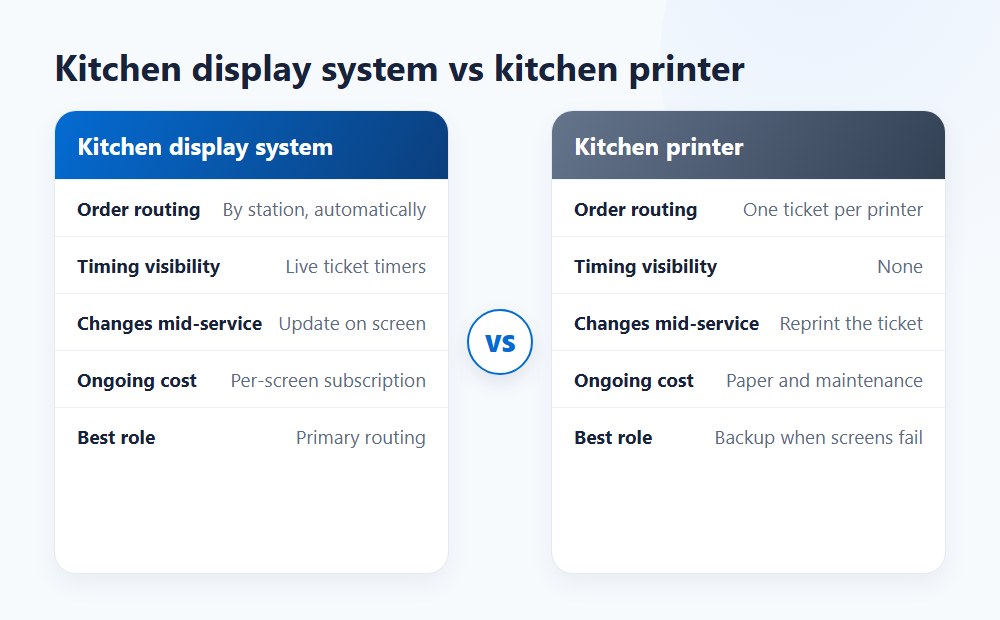
KDS is usually better for visibility, timing, and routing. Kitchen printers are usually cheaper upfront and still useful for backup. In many restaurants, the right answer is not KDS or printer — it is KDS plus printer backup.
Where KDS reduces delays and mistakes
KDS improves visibility because tickets are easier to route, track, and prioritize in real time. A screen-based workflow shows:
- prep timers
- all-day counts
- real-time ticket aging
- modifiers on active tickets
- clean routing by prep station
KDS does not magically fix a broken kitchen. But it usually beats paper when the problem is visibility and handoff discipline.
When a hybrid KDS + printer setup makes sense
| Workflow factor | KDS | Kitchen printer | Hybrid |
|---|---|---|---|
| Upfront cost | Higher | Lower | Mid |
| Real-time visibility | Strong | Weak | Strong |
| Order routing by station | Strong | Limited | Strong |
| Ticket timers / all-day counts | Yes | No | Yes |
| Failure resilience | Medium | Medium | Strong |
| Best use case | Busy routed kitchen | Very small simple line | Most practical transition path |
Printers are cheaper to start, KDS is stronger for active production control, and hybrid is often the safest real-world choice during rollout. Most kitchens that go fully screenless on day one regret it by week two.
Planning a kitchen upgrade with Shift4 Dine?
Planning a kitchen upgrade? Get professional Shift4 Dine (formerly SkyTab) installation with 24/7 support. Our experts, including Max Artemenko, ensure a seamless transition and order routing configuration matched to your kitchen format.
Learn about equipment specials and current offers
Is a kitchen display system worth the cost?
For many restaurants, yes. A KDS is worth the cost when the kitchen loses time or accuracy because paper tickets are hard to route, hard to read, or hard to manage during peaks.
Efficiency and throughput gains
KDS can improve throughput by showing the right tickets to the right station at the right time — reducing the coordination bottleneck that slows service during rush. According to a 2026 industry study, operators using AI-integrated kitchen management tools reported a 15–20% reduction in food waste through better ticket management and order accuracy, and operators actively using AI tools reported labor cost reductions of 8–12%. Source: Restaurant365 Research, 2026.
That said, a universal independent ROI benchmark for KDS alone does not exist in published form. The honest answer is a planning model.
Sample payoff model
Assume a two-screen setup costs:
- hardware and setup: $1,200–$2,500
- software: $30–$160/month, depending on tier
If the system prevents just:
- 2 remakes per shift at $12 food cost each
- 10 minutes of expo confusion during a rush
- 3 missed modifiers per day
the recovery becomes visible within months, not years.
In rollout work, the payoff usually comes from cleaner handoff, fewer verbal repeats, and fewer production misses.
Waste reduction, accuracy, and revenue effects
Waste reduction is one of the most practical ROI levers. Fewer missed items and fewer remakes protect margin. KDS can also support revenue indirectly by improving speed of service — faster turns and fewer order errors do not guarantee more sales, but they protect sales during rush periods.
Case: casual concept, modifier accuracy. A busy casual concept kept remaking heavily modified tickets because paper chit visibility was poor. We moved modifiers into clearer station-specific screen flow with expo verification. Result: fewer missed items and less re-fire waste during peak service.
The math is not complicated. Every remake costs food cost plus labor. Every missed modifier costs a guest experience. Neither shows up on the KDS invoice — but both show up on the P&L.
> “The quote that wins is rarely the one with the lowest screen number. It’s the one that shows routing, support, backup, and the real monthly cost in writing.” — Max Artemenko, POS Systems Expert & Product Architect
If you are pricing a KDS inside the Shift4 Dine ecosystem, the safest next step is to map the kitchen by stations first, then price the screens second. That keeps the system aligned with how the line actually works — and gives you the right baseline for an honest total cost comparison.
Pricing information in this guide is provided for planning purposes only and does not constitute a public offer or binding quote. All costs depend on individual business parameters, vendor terms, contract length, and hardware configuration. Verify all figures with a dated written quote from your vendor before making purchasing decisions.